Expose agents to external discovery
Use Agentic Resource Discovery to publish selected AgentField capabilities, import trusted outside agents, and make only approved imports callable.
AgentField agents already talk to each other with one simple shape: app.call("node.function"). That is the internal agent communication layer, with discovery, routing, execution records, IAM, and workflow context handled by the control plane.
Think of that as the MCP-like promise for AgentField agents: a capability can be found, called, observed, and governed without every caller hand-writing a client. Agentic Resource Discovery (ARD) extends the discovery part of that story to the outside network. It gives selected reasoners or skills a standards-shaped public catalog, and lets your control plane import selected external agent resources.
Use ARD when a capability should cross an organizational or network boundary. Keep normal app.discover() and app.call("node.function") for AgentField-to-AgentField communication inside your own deployment.
Where external discovery fits
| Layer | Use it for |
|---|---|
app.call("node.function") | Normal communication between AgentField agents in your control plane. |
app.discover() | Runtime discovery of healthy local agents, reasoners, and skills. |
/.well-known/ai-catalog.json | Public discovery of the agent capabilities you explicitly publish. |
| Discovery -> Imports | Recording external ARD entries your deployment may want to use. |
external.* bindings | Calling a trusted external resource after approval, adapter setup, auth, and policy scoping. |
Opt-in rules
ARD is opt-in at every step:
| Step | Meaning |
|---|---|
ard.enabled | The ARD feature is available. Nothing is public yet. |
publish.enabled | Public ARD routes may serve published entries. |
Expose through ARD | This specific reasoner or skill appears in ai-catalog.json. |
Import | AgentField knows an external ARD entry exists. |
Make callable | app.call() can route to that imported external entry. |
That separation matters. Turning on ARD should never publish a private reasoner or invoke a vendor system by itself.
1. Set deployment guardrails
Configure the control plane before launch. These settings define what the deployment is allowed to do; runtime choices live in the database and UI.
agentfield:
  ard:
    enabled: true
    public_base_url: "https://control-plane.example.com"
    publisher_domain: "example.com"
    host:
      display_name: "Example AgentField Control Plane"
      identifier: "did:web:example.com"
      documentation_url: "https://example.com/docs/agents"
    publish:
      enabled: true
      include_health_statuses: ["active", "unknown"]
      default_type: "application/openapi+json"
    registry:
      enabled: true
      public: true
    external:
      search_enabled: true
      invocation_enabled: true
      allowed_registries:
        - "https://registry.partner.example/api/v1/ard"
      default_search_limit: 10
The same guardrails can be set with environment variables:
export AGENTFIELD_ARD_ENABLED=true
export AGENTFIELD_ARD_PUBLIC_BASE_URL=https://control-plane.example.com
export AGENTFIELD_ARD_PUBLISHER_DOMAIN=example.com
export AGENTFIELD_ARD_PUBLISH_ENABLED=true
export AGENTFIELD_ARD_REGISTRY_ENABLED=true
export AGENTFIELD_ARD_REGISTRY_PUBLIC=true
export AGENTFIELD_ARD_EXTERNAL_SEARCH_ENABLED=true
export AGENTFIELD_ARD_EXTERNAL_INVOCATION_ENABLED=true
export AGENTFIELD_ARD_EXTERNAL_ALLOWED_REGISTRIES=https://registry.partner.example/api/v1/ard
2. Expose one internal capability
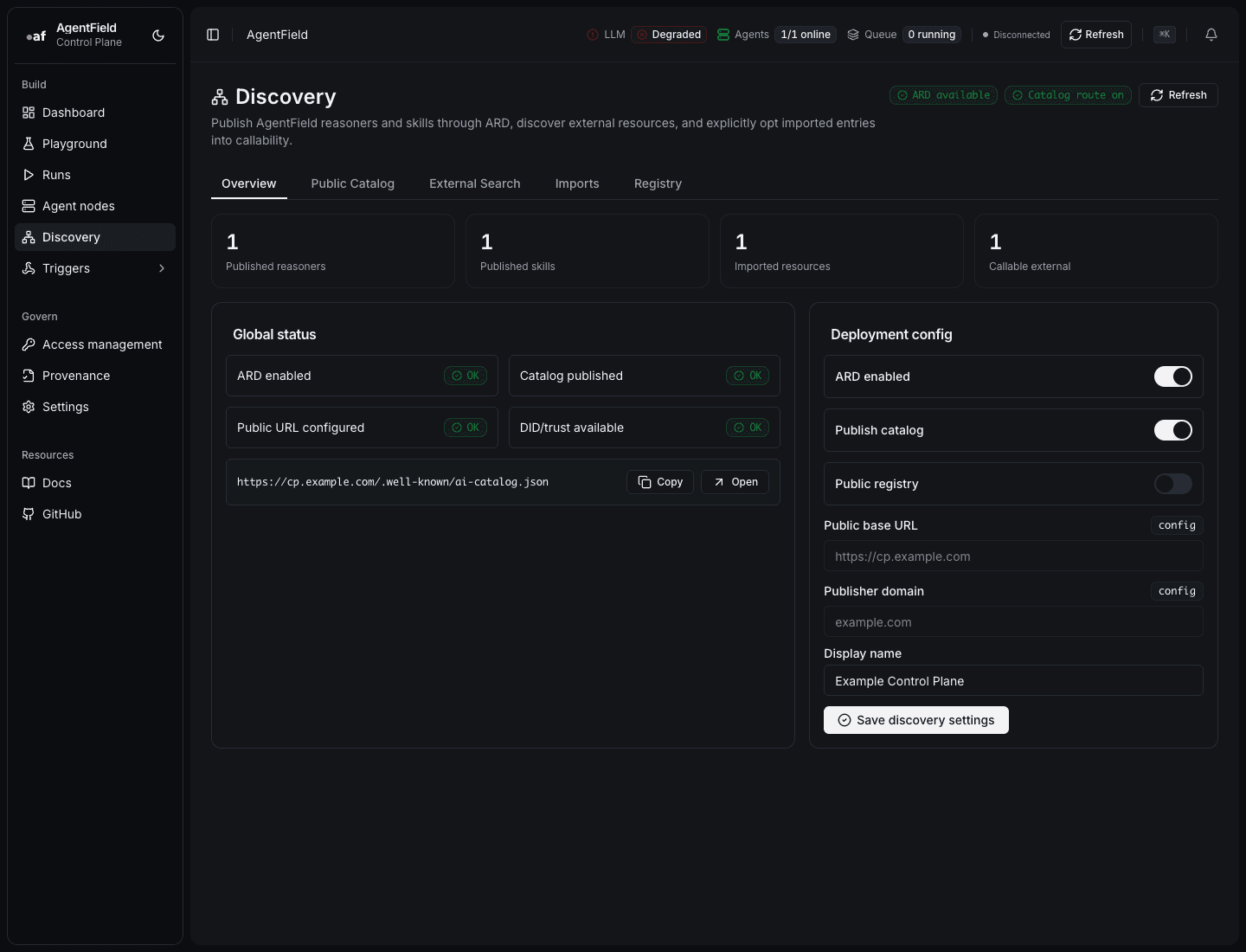
Open Discovery -> Overview first. It shows whether ARD is available, the catalog route is enabled, the public base URL is configured, and DID/trust data is available.
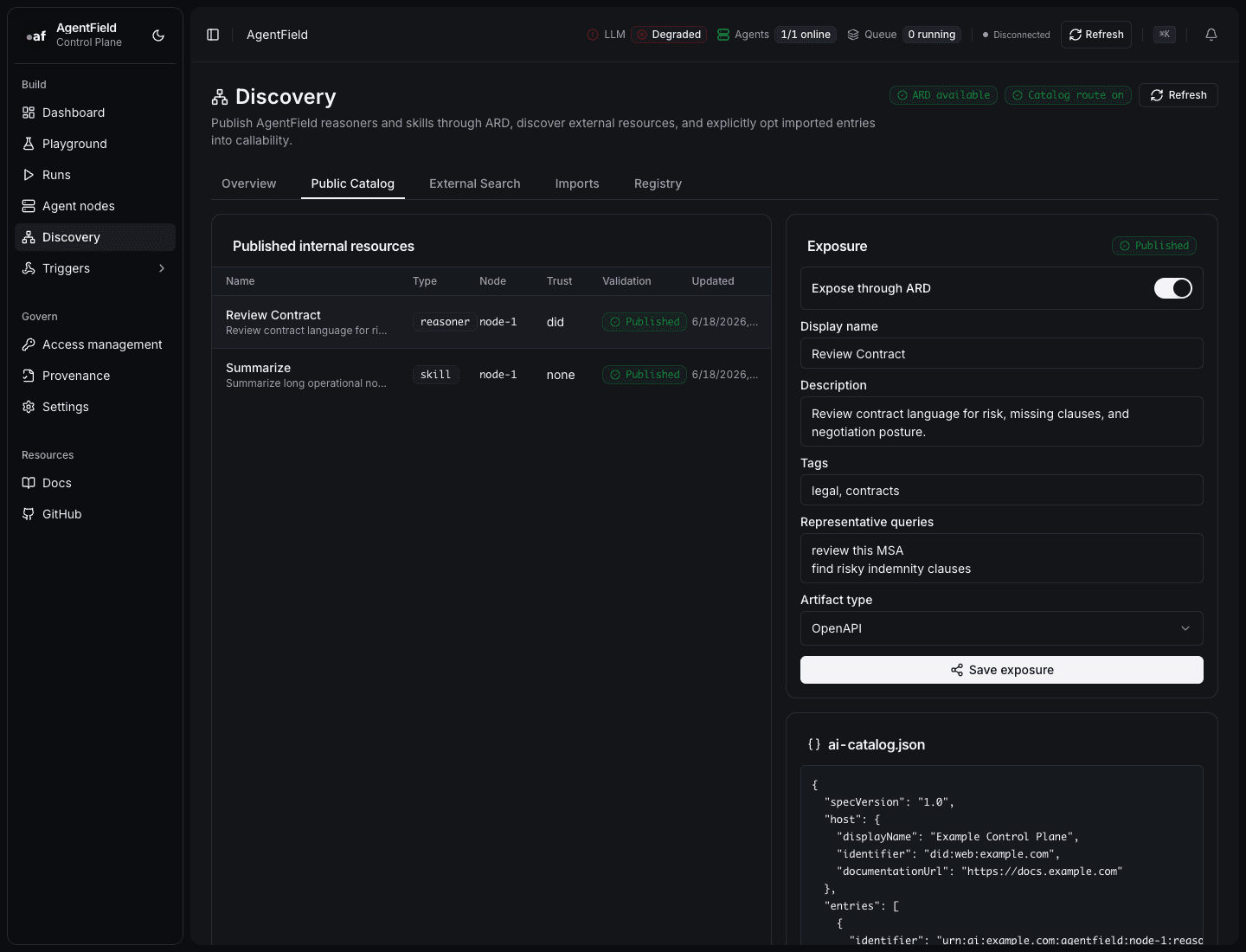
Then open Discovery -> Public Catalog or an agent's Agent nodes detail view:
- Choose a reasoner or skill.
- Turn on Expose through ARD.
- Fill in a display name, description, tags, representative queries, and artifact type.
- Save the exposure.
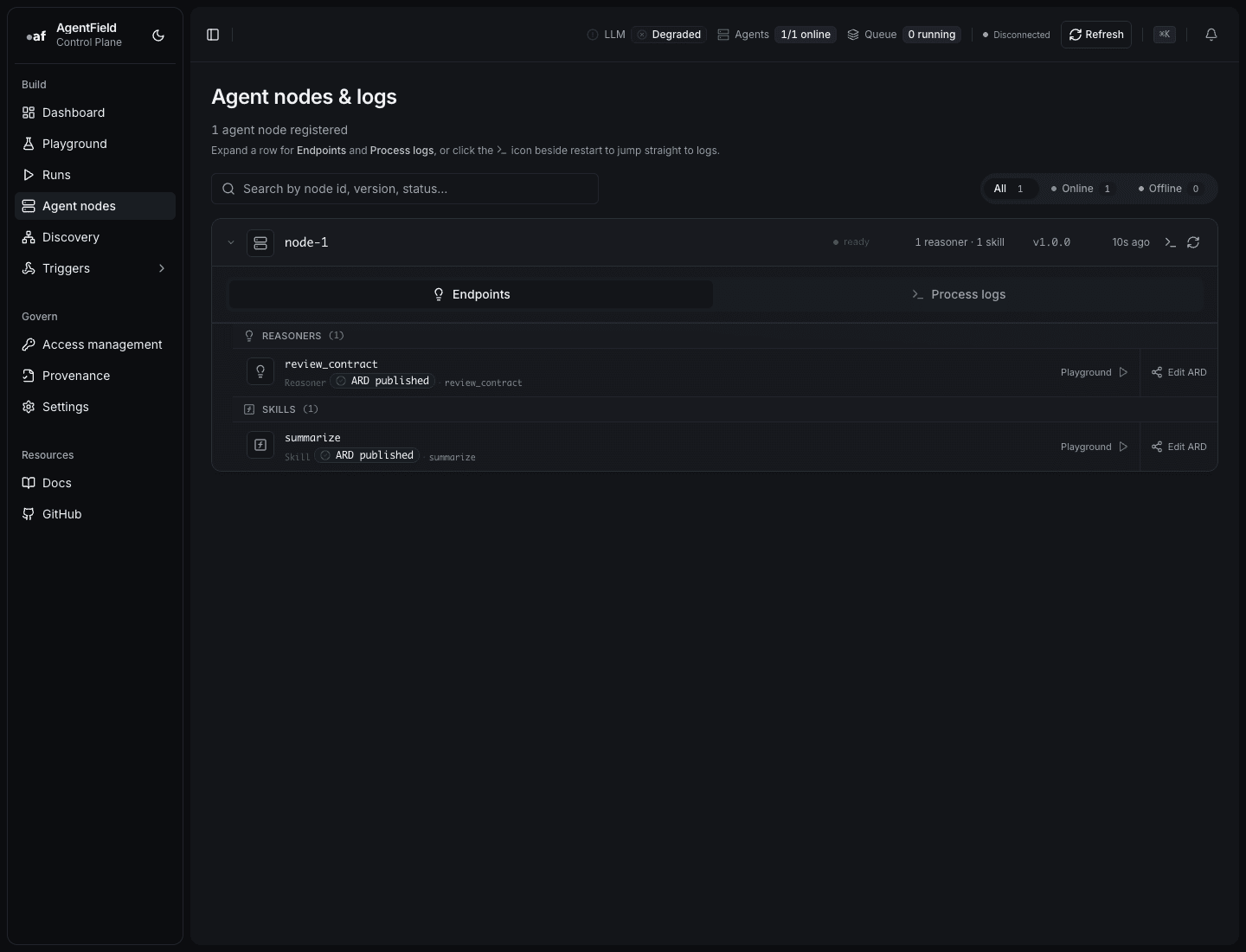
You can also start from Agent nodes when the operator is thinking about one deployed agent and its reasoners.
For non-OpenAPI artifacts, provide the artifact URL override. For example, if the entry is an A2A agent card or MCP server manifest, the catalog should point at that artifact instead of an auto-generated OpenAPI document.
{
  "identifier": "af://legal-agent/reasoner/review_contract",
  "displayName": "Contract Review Reasoner",
  "description": "Reviews contracts for risk, obligations, and approval gaps.",
  "type": "application/openapi+json",
  "url": "https://control-plane.example.com/api/v1/ard/artifacts/legal-agent.review_contract",
  "tags": ["contracts", "legal", "review"],
  "representativeQueries": [
    "Review this MSA for unusual liability clauses",
    "Summarize renewal obligations in this vendor contract"
  ],
  "trustManifest": {
    "identity": "did:web:example.com",
    "identityType": "did"
  }
}
Verify the public catalog:
curl https://control-plane.example.com/.well-known/ai-catalog.json | jq '.entries[] | .displayName'3. Search and import external resources
Open Discovery -> External Search to search configured registries. Results are read-only until imported, and search only reaches registries allowed by deployment config.
When you import a result, it appears in Discovery -> Imports. Importing records metadata such as identifier, publisher, source registry, representative queries, and trust summary. It still does not make the resource callable.
4. Make one import callable
In Discovery -> Imports, turn on Make callable only after the entry is trusted and scoped.
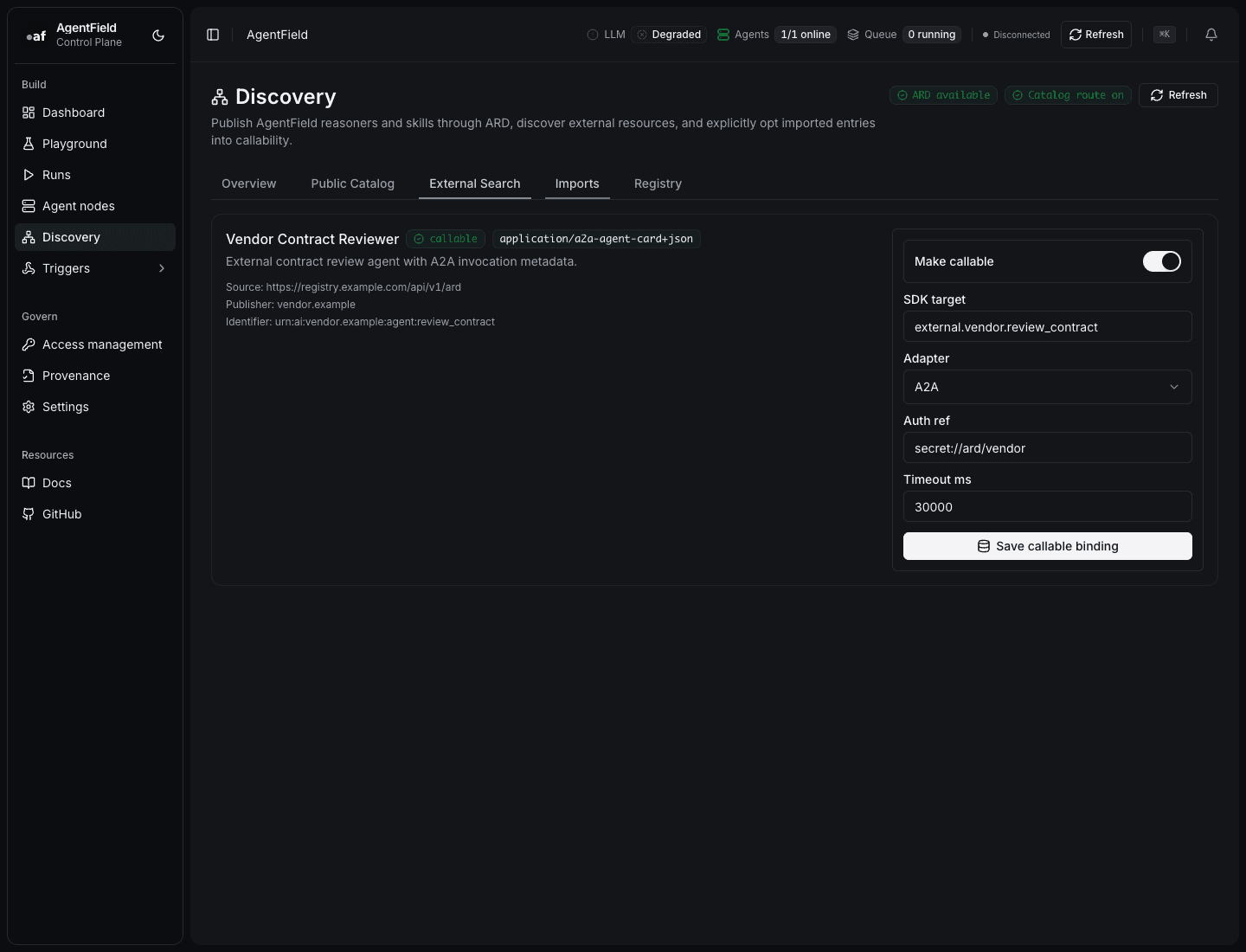
Configure:
| Field | Use it for |
|---|---|
| SDK target | The local target exposed to AgentField callers, for example external.vendor.review_contract. |
| Adapter | How AgentField will invoke it: OpenAPI, MCP, or A2A. |
| Auth ref | A reference to the credential to use. Store the secret outside the catalog entry. |
| Timeout | Bound slow vendor calls. |
| Allowed operations | Restrict which OpenAPI operation IDs or remote actions are callable. |
| Policy | Human-readable policy context for operators. |
After that, callers use the normal execution path:
result = await app.call(
    "external.vendor.review_contract",
    contract_text=contract_text,
    jurisdiction="US-NY",
)
const result = await app.call("external.vendor.review_contract", {
contractText,
jurisdiction: "US-NY",
});result, err := a.Call(ctx, "external.vendor.review_contract", map[string]any{
"contract_text": contractText,
"jurisdiction": "US-NY",
})Because this still flows through AgentField execution, you keep execution records, run IDs, parent-child call context, and the same governance boundary as other calls.
If you need per-caller tag policies around an external resource, expose it through a small local wrapper reasoner and protect that wrapper with access control. The wrapper can validate business context, call external.vendor.review_contract, and return a normalized result.
Cross-org IAM pattern
The useful story is not "an agent calls any outside agent." The useful story is controlled interoperability.
For example, a procurement team can import a partner's contract-review agent, bind it as external.vendor.review_contract, and expose a local wrapper reasoner such as legal.review_vendor_contract. Protect the wrapper with access policies, then let the wrapper call the external target.
- Only callers tagged
procurementorlegal-reviewcan call the local wrapper. - The external binding allows only the
reviewContractoperation. - The call carries AgentField run context and can be tied back to the caller's agent identity.
- Vendor credentials stay in your control plane, not in prompts or catalog metadata.
That is the blog-worthy example: cross-org agent capability sharing with explicit discovery, explicit import, explicit callability, and IAM at the boundary.
Related docs
Agent discovery — MCP-style for agents calling agents
Query a live registry of agents at runtime. Filter by tag and health, hand the result to an LLM as a tool list, let it pick.
Trigger agents on memory changes
Subscribe a reasoner to a memory key pattern. When any agent writes to a matching key, the reasoner fires.