Troubleshooting
Common errors, debugging patterns, and solutions for AgentField.
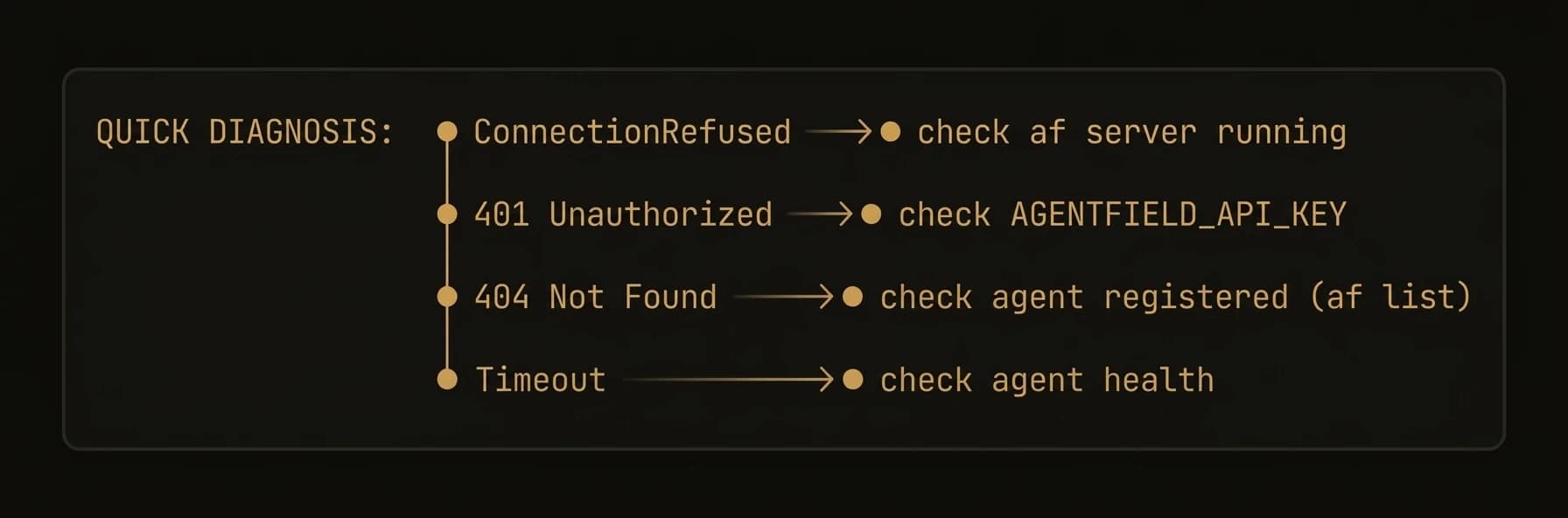
Diagnose and fix common issues when building with AgentField.
This guide covers the most frequent errors, debugging techniques, and configuration pitfalls. Start with the error table below, then dive into the relevant section.
Common Errors
| Error | Cause | Fix |
|---|---|---|
ConnectionRefusedError | Control plane is not running | Start the control plane with af server or check the host/port configuration |
401 Unauthorized | Missing or invalid API key | Pass api_key= to the Agent constructor |
404 Agent not found | Agent is not registered with the control plane | Ensure the agent is running with app.serve() |
429 Too Many Requests | LLM provider rate limit exceeded | Add retry logic, reduce concurrency, or configure a fallback model |
TimeoutError | Execution exceeded the configured deadline | Increase timeout (in seconds) on AIConfig, or set default_execution_timeout in AsyncConfig for long-running tasks |
Debugging Reasoners
Enable verbose logging
Set the log level before starting your agent to see every execution step, tool call, and LLM request:
import logging
logging.basicConfig(level=logging.DEBUG)

from agentfield import Agent, AIConfig

app = Agent(
    node_id="debug-agent",
    ai_config=AIConfig(model="anthropic/claude-sonnet-4-20250514"),
)
In production, use logging.INFO to avoid flooding your logs with LLM request/response bodies.
Inspect execution context
Use execution notes to trace what happened during a reasoner call:
@app.reasoner()
async def analyze(text: str) -> dict:
    app.note("Starting analysis")

    result = await app.ai(
        system="Analyze the following text.",
        user=text,
    )

    app.note(f"Analysis complete, result keys: {list(result.keys()) if isinstance(result, dict) else 'N/A'}")
    return result
Use execution notes
Attach structured notes to an execution for post-hoc debugging. Notes are stored alongside the execution record and visible in the dashboard:
@app.reasoner()
async def classify(document: str) -> dict:
    intake = await app.ai(
        system="Classify this document.",
        user=document[:2000],
        schema=IntakeResult,
    )

    # Attach a note explaining the classification decision
    app.note(f"Classified as {intake.category}, confidence={intake.confidence}")

    if not intake.confident:
        app.note("Low confidence — escalating to harness")
        # fallback to deeper analysis
        return await app.call("my-agent.deep_classify", document=document)

    return intake.model_dump()
Execution notes are included in the cryptographic audit trail. Use them liberally during development.
LLM Errors
Model not found
AgentFieldError: Model "anthropic/claude-opus-4-20250514" not found or not availableCauses:
- Typo in the model identifier
- The model is not enabled in your LLM provider account
- Your
api_baseinAIConfigpoints to a provider that does not serve this model
Fix: Check the model name against your provider's documentation. AgentField uses LiteLLM-style model identifiers (provider/model-name).
API key issues
AgentFieldClientError: Invalid API key for provider "anthropic"Fix: Set the provider-specific key as an environment variable:
export ANTHROPIC_API_KEY="sk-ant-..."
export OPENAI_API_KEY="sk-..."
Or pass it through your AIConfig:
app = Agent(
    node_id="my-agent",
    ai_config=AIConfig(
        model="anthropic/claude-sonnet-4-20250514",
        api_key="sk-ant-...",  # not recommended for production
    ),
)
Never hardcode API keys in source code. Use environment variables or a secrets manager.
Rate limiting and fallback models
When an LLM provider returns 429 Too Many Requests, AgentField surfaces the error to your agent. To handle this gracefully, configure fallback models:
app = Agent(
    node_id="resilient-agent",
    ai_config=AIConfig(
        model="anthropic/claude-sonnet-4-20250514",
        fallback_models=[
            "openai/gpt-4o",
            "anthropic/claude-haiku-4-20250514",
        ],
        retry_attempts=3,
        retry_delay=1.0,
    ),
)
AgentField will try each fallback model in order when the primary model fails.
Memory Errors
Key not found
If memory.get() returns None unexpectedly, the key may not have been written yet or was written under a different scope.
Fix: Use get with a default value to handle missing keys gracefully:
value = await app.memory.get("my-key", default=None)You can also check whether a key exists before reading:
if await app.memory.exists("my-key"):
    value = await app.memory.get("my-key")
Vector dimension mismatch
MemoryAccessError: Vector dimension mismatch — expected 1536, got 768Cause: The embedding model used to write vectors differs from the one configured for reads. This happens when you change the embedding model after data has been stored.
Fix: Use the same embedding model consistently. If you need to change models, delete the old vectors and re-store them with the new model.
Re-indexing vectors requires re-computing embeddings, which can be slow and costly. Test with a small dataset first.
Network & Connectivity
Control plane connection
If your agent cannot reach the control plane:
-
Verify the control plane is running:
af server -
Check the connection URL:
app = Agent( node_id="my-agent", agentfield_server="http://localhost:8080", # default ) -
Check firewall and network rules — the agent must be able to reach the control plane on the configured port.
-
Look at control plane logs for rejected connections or auth failures by running the server with verbose logging:
af server --verbose
Agent registration failures
RegistrationError: Agent "my-agent" failed to register — conflict with existing node_idCauses:
- Another agent is already registered with the same
node_id - A previous instance did not deregister cleanly
Fix:
- Use a unique
node_idfor each agent instance - If the previous instance crashed, the control plane will eventually expire the stale registration (default: 60 seconds)
- If the previous instance crashed, wait for the stale registration to expire (default: 60 seconds), then restart your agent.
Session Errors
Errors specific to realtime sessions.
Unsupported provider/transport pair
Unsupported session transport 'webrtc' for provider 'openrouter'.
Supported transports: audio_turns.
AgentField does not infer or switch providers; set provider and transport explicitly.
Cause: The provider and transport declared on @app.session(...) (or passed to af session start) are not a validated pair.
Fix: Use one of the supported pairs. AgentField validates the pair at registration and refuses to silently substitute.
| Provider | Transport |
|---|---|
openai | webrtc |
openai | websocket |
openrouter | audio_turns |
SDP offer rejected
realtime offer failed: provider returned 401 / 4xxCauses:
- Provider API key missing or invalid on the control plane.
- The SDP offer was generated for a different model than the session was started with.
- The session ID is unknown or has been ended.
Fix: Confirm the provider key is set on the control plane (the browser must not hold it). Re-run af session start ... to get a fresh session_id and use its offer_url.
Missing provider key
provider 'openai' is not configured on the control planeFix: Set the provider key as an environment variable on the control plane, not the browser or the agent node:
export OPENAI_API_KEY="sk-..."Sessions intentionally do not accept provider keys from the client — that is the boundary the session primitive exists to enforce.
Session tool call not appearing in the workflow DAG
Cause: The tool was invoked outside the session — for example, the browser called the agent directly instead of going through /api/v1/session-instances/:session_id/tools/:tool (or af session tool).
Fix: Route the call through the session tool URL returned by af session start. The control plane forwards it to execute/async with X-Session-ID attached so it lands in the session's DAG. See Workflow tracing.
Environment Variables
Complete reference of all AGENTFIELD_* environment variables:
| Variable | Description | Default |
|---|---|---|
AGENTFIELD_API_KEY | Not supported in the Python SDK. Pass api_key= to the Agent constructor instead. | (n/a) |
AGENTFIELD_SERVER | URL of the AgentField server (control plane). Also accepts AGENTFIELD_SERVER_URL. | http://localhost:8080 |
AGENTFIELD_LOG_LEVEL | Logging verbosity: DEBUG, INFO, WARNING, ERROR | WARNING |
AGENTFIELD_PORT | Override the default control plane port | 8080 |
AGENTFIELD_HOME | Override the default AgentField home directory | ~/.agentfield |
AGENTFIELD_AGENT_MAX_CONCURRENT_CALLS | Max concurrent cross-agent calls per agent | (SDK default) |
AGENTFIELD_AUTO_PORT | Set to true for automatic port assignment | false |
ANTHROPIC_API_KEY | API key for Anthropic models (used by LiteLLM) | (none) |
OPENAI_API_KEY | API key for OpenAI models (used by LiteLLM) | (none) |
Explicit parameters take precedence over environment variables, which take precedence over defaults (i.e., explicit params > env vars > defaults). This lets you override config per environment using env vars while still allowing code-level overrides.