REST API
Complete HTTP endpoint reference for the AgentField control plane.
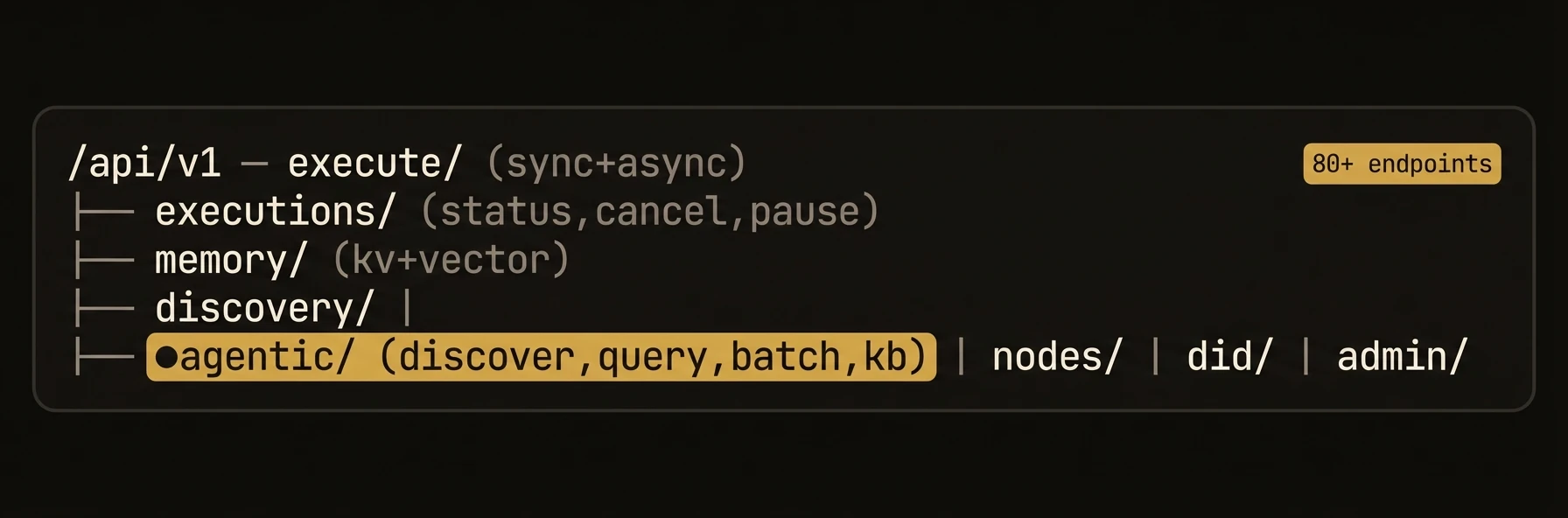
Complete HTTP endpoint reference for the AgentField control plane.
Every AgentField control plane exposes a REST API on its configured port (default 8080). All agent-facing endpoints live under the /api/v1 prefix. All request and response bodies are JSON.
Authentication
Most endpoints require the control plane API key passed as a Bearer token:
Authorization: Bearer <AGENTFIELD_API_KEY>Admin endpoints require a separate admin token configured via AGENTFIELD_AUTHORIZATION_ADMIN_TOKEN.
Agentic API — AI-Native Endpoints
Unlike traditional APIs that assume a human developer reading docs, the Agentic API provides self-describing capabilities, structured queries over platform resources, and batched operations so an AI agent can explore and use the control plane programmatically.
Discovery
GET /api/v1/agentic/discoverReturns a machine-readable catalog of API endpoints from the control plane's internal catalog. AI agents can use this as a first call to understand what the platform can do.
Response:
{
  "endpoints": [
    {
      "method": "GET",
      "path": "/api/v1/agentic/status",
      "summary": "Get system status overview",
      "group": "agentic"
    }
  ],
  "total": 1,
  "groups": ["agentic", "discovery", "memory"],
  "filters": { "q": "", "group": "", "method": "" },
  "see_also": {
    "live_agents": "GET /api/v1/discovery/capabilities",
    "kb": "GET /api/v1/agentic/kb/topics"
  }
}
Example:
curl -s -H "Authorization: Bearer $AF_KEY" \
  http://localhost:8080/api/v1/agentic/discover | jq '.endpoints[].path'
Structured Resource Query
POST /api/v1/agentic/queryQuery platform resources with an explicit resource name plus filters. This is the primary interface for AI agents that need a predictable response shape.
Request:
{
  "resource": "executions",
  "filters": {
    "status": "completed",
    "agent_id": "doc-parser"
  },
  "limit": 10,
  "offset": 0
}
Response:
{
  "resource": "executions",
  "results": [
    {
      "execution_id": "exec_123",
      "status": "completed"
    }
  ],
  "total": 1,
  "limit": 10,
  "offset": 0
}
Example:
curl -s -X POST -H "Authorization: Bearer $AF_KEY" \
  -H "Content-Type: application/json" \
  -d '{"resource":"agents","limit":5}' \
  http://localhost:8080/api/v1/agentic/query
Batch Operations
POST /api/v1/agentic/batchCombine multiple API calls into a single request. Reduces round-trips for AI agents that need to perform several operations through one control-plane call.
Request:
{
  "operations": [
    {
      "id": "op1",
      "method": "GET",
      "path": "/api/v1/nodes"
    },
    {
      "id": "op2",
      "method": "POST",
      "path": "/api/v1/memory/get",
      "body": { "key": "session:current", "namespace": "global" }
    },
    {
      "id": "op3",
      "method": "POST",
      "path": "/api/v1/execute/planner.analyze",
      "body": { "input": { "topic": "quarterly review" } }
    }
  ]
}
Response:
{
  "results": [
    { "id": "op1", "status": 200, "body": { "nodes": ["..."] } },
    { "id": "op2", "status": 200, "body": { "value": "sess_abc123" } },
    { "id": "op3", "status": 200, "body": { "execution_id": "exec_7f3a", "status": "completed", "result": {"...": "..."} } }
  ],
  "total": 3
}
Run and Agent Summary
| Method | Endpoint | Description | Auth |
|---|---|---|---|
| GET | /api/v1/agentic/run/:run_id | Get overview of a workflow run including step statuses | Yes |
| GET | /api/v1/agentic/agent/:agent_id/summary | Get agent summary: capabilities, recent executions, health | Yes |
| GET | /api/v1/agentic/status | Platform status summary: node count, memory usage, uptime | Yes |
Example — agent summary:
curl -s -H "Authorization: Bearer $AF_KEY" \
  http://localhost:8080/api/v1/agentic/agent/email-assistant/summary
{
"agent_id": "email-assistant",
"status": "online",
"uptime_seconds": 84720,
"capabilities": ["draft", "send", "search"],
"recent_executions": {
"total_24h": 142,
"success_rate": 0.97,
"avg_duration_ms": 1230
},
"memory_usage": {
"kv_keys": 38,
"vector_count": 1024
}
}Agentic Resource Discovery (ARD)
Agentic Resource Discovery exposes selected AgentField reasoners and skills through a public catalog and lets operators import external entries into the control plane. See Expose agents to external discovery for the operator flow.
Public Catalog
GET /.well-known/ai-catalog.jsonReturns the public Agentic Resource Discovery catalog when agentfield.ard.enabled, agentfield.ard.publish.enabled, and runtime publishing are enabled.
curl https://control-plane.example.com/.well-known/ai-catalog.json | jq '.entries'Public ARD Registry Routes
These routes are under the normal API prefix:
| Method | Endpoint | Description |
|---|---|---|
| GET | /api/v1/ard/artifacts/:entryID | Fetch the generated artifact for a published entry, usually OpenAPI JSON. |
| POST | /api/v1/ard/search | Search published catalog entries. |
| GET | /api/v1/ard/agents | List published catalog entries using registry-style pagination. |
| POST | /api/v1/ard/explore | Explore catalog facets and available entry metadata. |
Example search:
curl -s -X POST https://control-plane.example.com/api/v1/ard/search \
  -H "Content-Type: application/json" \
  -d '{"query":{"text":"contract review"},"pageSize":10}' | jq '.results'
UI Runtime State
Authenticated UI routes live under /api/ui/v1/ard:
| Method | Endpoint | Description |
|---|---|---|
| GET | /api/ui/v1/ard | Discovery dashboard: config, summary, catalog preview, publications, imports, registries. |
| PUT | /api/ui/v1/ard/settings | Save runtime ARD settings where they are not locked by config. |
| PUT | /api/ui/v1/ard/publications | Save one reasoner/skill publication and metadata. |
| POST | /api/ui/v1/ard/external/search | Search configured external ARD registries. |
| POST | /api/ui/v1/ard/imports | Import one external ARD entry. |
| PUT | /api/ui/v1/ard/imports/:entryID/binding | Configure whether an imported entry is callable as an external.* target. |
| PUT | /api/ui/v1/ard/registries | Save known registry records. |
Callable external entries use the same execution API as local targets:
curl -s -X POST http://localhost:8080/api/v1/execute/external.vendor.review_contract \
  -H "Authorization: Bearer $AF_KEY" \
  -H "Content-Type: application/json" \
  -d '{"input":{"contract_text":"..."}}'
The call succeeds only when agentfield.ard.external.invocation_enabled is true and the imported entry has an enabled callable binding.
Knowledge Base
The knowledge base provides self-serve documentation endpoints that AI agents can query to learn how to use the platform without external docs.
| Method | Endpoint | Description | Auth |
|---|---|---|---|
| GET | /api/v1/agentic/kb/topics | List knowledge base topics | No |
| GET | /api/v1/agentic/kb/articles | List knowledge base articles | No |
| GET | /api/v1/agentic/kb/articles/:article_id | Get a specific article | No |
| GET | /api/v1/agentic/kb/guide | Get the quick-start guide | No |
Example — get the quick-start guide:
curl -s http://localhost:8080/api/v1/agentic/kb/guide | jq '.title, .steps[0]'Session Endpoints
Sessions
Sessions are realtime or multimodal entrypoints declared by SDK agents and started through the control plane.
Start a Session
POST /api/v1/session-targets/:target/starttarget uses <node_id>.<session_name>.
Request:
{
  "provider": "openai",
  "transport": "webrtc",
  "model": "gpt-realtime-2",
  "voice": "marin"
}
Response:
{
  "session_id": "sess_123",
  "target": "voice-support-af.voice",
  "provider": "openai",
  "transport": "webrtc",
  "offer_url": "/api/v1/session-instances/sess_123/realtime-offer",
  "tool_url": "/api/v1/session-instances/sess_123/tools/{tool}",
  "tool_targets": {
    "voice-support-af.resolve_voice_turn": "voice-support-af.resolve_voice_turn"
  },
  "tags": ["support:voice"]
}
Exchange Realtime Offer
POST /api/v1/session-instances/:session_id/realtime-offer?provider=openai&transport=webrtcFor WebRTC, send the SDP offer as application/sdp; the response body is the SDP answer.
curl -s -X POST \
  "http://localhost:8080/api/v1/session-instances/sess_123/realtime-offer?provider=openai&transport=webrtc" \
  -H "Content-Type: application/sdp" \
  --data-binary @offer.sdp > answer.sdp
Invoke a Session Tool
POST /api/v1/session-instances/:session_id/tools/:toolThis endpoint is for provider/client-driven tool calls during a live session. Handler-controlled orchestration should use the SDK's session.call(...) or normal app.call(...) path.
Request:
{
  "target": "voice-support-af.resolve_voice_turn",
  "input": {
    "turn": {
      "transcript": "My order has not arrived."
    }
  }
}
The control plane forwards the tool call to execute/async with the session ID attached. That keeps provider-driven reasoner work visible in normal AgentField workflow views.
Provider and transport are explicit. AgentField validates the pair and does not infer or switch providers.
Execution Endpoints
Execution
Synchronous Execution
POST /api/v1/execute/:targetExecute a reasoner or skill synchronously. The target is formatted as agent.reasoner_id or agent.skill_id.
Request:
{
  "input": {
    "prompt": "Summarize the Q4 earnings report",
    "max_tokens": 2000
  },
  "context": {
    "session_id": "sess_123"
  },
  "webhook": {
    "url": "https://example.com/agentfield-webhook"
  }
}| Field | Type | Required | Description |
|---|---|---|---|
input | object | Yes | Input payload passed to the reasoner/skill |
context | object | No | Optional execution context propagated with the request |
webhook | object | No | Optional webhook registration for completion delivery |
Response (200):
{
  "execution_id": "exec_8f2a1b3c",
  "run_id": "run_8f2a1b3c",
  "status": "completed",
  "result": {
    "summary": "Q4 revenue grew 23% year-over-year...",
    "confidence": 0.92
  },
  "duration_ms": 2340,
  "finished_at": "2026-03-24T10:15:12Z",
  "webhook_registered": false
}
Error Response (400):
{
  "error": "invalid_target",
  "message": "Target 'summarizer.nonexistent' not found. Available targets: summarizer.analyze, summarizer.extract",
  "available_targets": ["summarizer.analyze", "summarizer.extract"]
}
Example:
curl -X POST -H "Authorization: Bearer $AF_KEY" \
  -H "Content-Type: application/json" \
  -d '{"input": {"prompt": "Summarize the Q4 report"}}' \
  http://localhost:8080/api/v1/execute/summarizer.analyze
Asynchronous Execution
POST /api/v1/execute/async/:targetQueue an execution and return immediately with an execution_id. Use the status endpoint to poll for results.
Request: Same as synchronous execution.
Response (202):
{
  "execution_id": "exec_c94d2e1f",
  "run_id": "run_c94d2e1f",
  "workflow_id": "run_c94d2e1f",
  "status": "queued",
  "target": "doc-parser.extract",
  "type": "reasoner",
  "created_at": "2026-03-24T10:15:00Z",
  "webhook_registered": false
}
Example:
# Start async execution
EXEC_ID=$(curl -s -X POST -H "Authorization: Bearer $AF_KEY" \
  -H "Content-Type: application/json" \
  -d '{"input": {"document_url": "s3://bucket/large-report.pdf"}}' \
  http://localhost:8080/api/v1/execute/async/doc-parser.extract \
  | jq -r '.execution_id')

# Poll for result
curl -s -H "Authorization: Bearer $AF_KEY" \
  http://localhost:8080/api/v1/executions/$EXEC_ID
Legacy aliases (kept for backward compatibility):
| Method | Endpoint | Description | Auth |
|---|---|---|---|
| POST | /api/v1/reasoners/:reasoner_id | Execute a reasoner by ID | Yes |
| POST | /api/v1/skills/:skill_id | Execute a skill by ID | Yes |
Execution Status and Lifecycle
Get Execution Status
GET /api/v1/executions/:execution_idResponse:
{
  "execution_id": "exec_c94d2e1f",
  "run_id": "run_c94d2e1f",
  "status": "completed",
  "result": { "pages": 42, "text": "..." },
  "started_at": "2026-03-24T10:15:00Z",
  "completed_at": "2026-03-24T10:15:12Z",
  "duration_ms": 12340,
  "webhook_registered": false
}
Status values: queued, running, completed, failed, cancelled, paused.
Batch Status
POST /api/v1/executions/batch-statusRequest:
{
  "execution_ids": ["exec_c94d2e1f", "exec_a1b2c3d4", "exec_e5f6g7h8"]
}
Response:
{
  "exec_c94d2e1f": { "execution_id": "exec_c94d2e1f", "status": "completed" },
  "exec_a1b2c3d4": { "execution_id": "exec_a1b2c3d4", "status": "running" },
  "exec_e5f6g7h8": { "execution_id": "exec_e5f6g7h8", "status": "failed", "error": "Node offline" }
}
Lifecycle Operations
| Method | Endpoint | Description | Auth |
|---|---|---|---|
| POST | /api/v1/executions/:execution_id/status | Update execution status (used by agent nodes internally) | Yes |
| POST | /api/v1/executions/:execution_id/cancel | Cancel a running or queued execution | Yes |
| POST | /api/v1/executions/:execution_id/pause | Pause a running execution | Yes |
| POST | /api/v1/executions/:execution_id/resume | Resume a paused execution | Yes |
Example — cancel an execution:
curl -X POST -H "Authorization: Bearer $AF_KEY" \
  http://localhost:8080/api/v1/executions/exec_c94d2e1f/cancel
Response:
{
  "execution_id": "exec_c94d2e1f",
  "status": "cancelled",
  "cancelled_at": "2025-03-24T10:16:00Z"
}
Execution Notes
Attach notes to an execution for audit trails, debugging, or inter-agent communication.
POST /api/v1/executions/noteRequest:
{
  "message": "Retrying with increased timeout due to large document size",
  "tags": ["retry", "debug"]
}
Provide the execution ID via the active execution context, the X-Execution-ID header, or a query parameter.
GET /api/v1/executions/:execution_id/notesResponse:
{
  "execution_id": "exec_c94d2e1f",
  "notes": [
    {
      "id": "note_1a2b3c",
      "note": "Retrying with increased timeout due to large document size",
      "author": "orchestrator-agent",
      "created_at": "2025-03-24T10:15:30Z"
    }
  ]
}
Approval (Human-in-the-Loop)
Approval
Human-in-the-loop approval allows agents to pause execution and request human sign-off before proceeding with sensitive operations.
Request Approval
POST /api/v1/agents/:node_id/executions/:execution_id/request-approvalRequest:
{
  "approval_request_id": "req-123",
  "approval_request_url": "https://internal.example.com/approvals/req-123",
  "callback_url": "https://your-app.com/webhooks/approval"
}| Field | Type | Required | Description |
|---|---|---|---|
approval_request_id | string | Yes | External approval request identifier |
approval_request_url | string | No | Human-facing review URL |
callback_url | string | No | Webhook URL for approval notifications |
expires_in_hours | integer | No | Optional expiry window |
Response (202):
{
  "approval_request_id": "req-123",
  "approval_request_url": "https://internal.example.com/approvals/req-123"
}
Check Approval Status
GET /api/v1/agents/:node_id/executions/:execution_id/approval-statusResponse:
{
  "status": "approved",
  "response": {
    "decision": "approved",
    "feedback": "Approved - batch is expected"
  },
  "request_url": "https://internal.example.com/approvals/req-123",
  "requested_at": "2026-03-24T10:15:00Z",
  "responded_at": "2026-03-24T10:20:00Z"
}
Status values: pending, approved, rejected, expired.
Agent-Scoped Approval
For multi-agent setups, scope approval requests to a specific agent node:
| Method | Endpoint | Description | Auth |
|---|---|---|---|
| POST | /api/v1/agents/:node_id/executions/:execution_id/request-approval | Agent-scoped approval request | Yes |
| GET | /api/v1/agents/:node_id/executions/:execution_id/approval-status | Agent-scoped approval status | Yes |
External Approval Webhook
POST /api/v1/webhooks/approval-responseReceive approval decisions from external systems (Slack bots, email links, custom UIs).
Request:
{
  "requestId": "req-123",
  "decision": "approved",
  "feedback": "Looks good, proceed"
}
Example — full approval flow:
# 1. Request approval
curl -X POST -H "Authorization: Bearer $AF_KEY" \
  -H "Content-Type: application/json" \
  -d '{"approval_request_id":"req-123","expires_in_hours":1}' \
  http://localhost:8080/api/v1/agents/my-agent/executions/exec_c94d2e1f/request-approval

# 2. Check status (poll or use webhook)
curl -s -H "Authorization: Bearer $AF_KEY" \
  http://localhost:8080/api/v1/agents/my-agent/executions/exec_c94d2e1f/approval-status

# 3. Once approved, resume the execution
curl -X POST -H "Authorization: Bearer $AF_KEY" \
  http://localhost:8080/api/v1/executions/exec_c94d2e1f/resume
Node Registration and Lifecycle
Node Registration
Agent nodes register with the control plane on startup and maintain their presence via heartbeats.
Register a Node
POST /api/v1/nodes/registerRequest:
{
  "name": "email-assistant",
  "url": "http://10.0.1.5:8005",
  "capabilities": {
    "reasoners": [
      {
        "id": "draft",
        "description": "Draft an email from a prompt",
        "input_schema": { "type": "object", "properties": { "prompt": { "type": "string" } } },
        "output_schema": { "type": "object", "properties": { "subject": { "type": "string" }, "body": { "type": "string" } } }
      }
    ],
    "skills": [
      {
        "id": "send",
        "description": "Send a drafted email"
      }
    ]
  },
  "tags": ["email", "communication"],
  "metadata": {
    "version": "1.2.0",
    "language": "python"
  }
}| Field | Type | Required | Description |
|---|---|---|---|
name | string | Yes | Unique agent name |
url | string | Yes | Reachable URL of the agent node |
capabilities | object | Yes | Reasoners and skills this node exposes |
tags | string[] | No | Tags for discovery and policy matching |
metadata | object | No | Arbitrary metadata (version, language, etc.) |
Response (201):
{
  "node_id": "node_a1b2c3d4",
  "name": "email-assistant",
  "status": "online",
  "registered_at": "2025-03-24T10:00:00Z",
  "heartbeat_interval_seconds": 30
}
Error Response (409):
{
  "error": "node_already_registered",
  "message": "Node 'email-assistant' is already registered. Use PUT to update or DELETE to unregister first.",
  "existing_node_id": "node_a1b2c3d4"
}
Example:
curl -X POST -H "Authorization: Bearer $AF_KEY" \
  -H "Content-Type: application/json" \
  -d '{
    "name": "my-agent",
    "url": "http://localhost:8005",
    "capabilities": {"reasoners": [], "skills": []}
  }' \
  http://localhost:8080/api/v1/nodes/register
Other Registration Endpoints
| Method | Endpoint | Description | Auth |
|---|---|---|---|
| POST | /api/v1/nodes | Alias for node registration | Yes |
| POST | /api/v1/nodes/register-serverless | Register a serverless agent node (no heartbeat required) | Yes |
| GET | /api/v1/nodes | List all registered nodes | Yes |
| GET | /api/v1/nodes/:node_id | Get details of a specific node | Yes |
| DELETE | /api/v1/nodes/:node_id/monitoring | Unregister a node from health monitoring | Yes |
Heartbeat
POST /api/v1/nodes/:node_id/heartbeatNodes must send heartbeats at the interval specified during registration. Missed heartbeats mark the node as unhealthy after 3 missed intervals.
Request:
{
  "status": "healthy",
  "load": {
    "active_executions": 2,
    "queue_depth": 5,
    "cpu_percent": 45.2,
    "memory_mb": 512
  }
}
Response (200):
{
  "acknowledged": true,
  "next_heartbeat_seconds": 30
}
Example:
curl -X POST -H "Authorization: Bearer $AF_KEY" \
  -H "Content-Type: application/json" \
  -d '{"status": "healthy", "load": {"active_executions": 0}}' \
  http://localhost:8080/api/v1/nodes/node_a1b2c3d4/heartbeat
Node Status
| Method | Endpoint | Description | Auth |
|---|---|---|---|
| GET | /api/v1/nodes/:node_id/status | Get current status of a node | Yes |
| POST | /api/v1/nodes/:node_id/status/refresh | Force a status refresh | Yes |
| POST | /api/v1/nodes/status/bulk | Get status for multiple nodes | Yes |
| POST | /api/v1/nodes/status/refresh | Force a status refresh for all nodes | Yes |
| PATCH | /api/v1/nodes/:node_id/status | Lease-based status update | Yes |
GET status response:
{
  "node_id": "node_a1b2c3d4",
  "name": "email-assistant",
  "status": "online",
  "last_heartbeat": "2025-03-24T10:14:30Z",
  "uptime_seconds": 84720,
  "load": {
    "active_executions": 2,
    "queue_depth": 5
  }
}
Node Lifecycle
| Method | Endpoint | Description | Auth |
|---|---|---|---|
| POST | /api/v1/nodes/:node_id/start | Start a stopped node | Yes |
| POST | /api/v1/nodes/:node_id/stop | Stop a running node | Yes |
| POST | /api/v1/nodes/:node_id/shutdown | Graceful shutdown (drains queue first) | Yes |
| POST | /api/v1/nodes/:node_id/actions/ack | Acknowledge a pending action | Yes |
| POST | /api/v1/actions/claim | Claim pending actions | Yes |
Example — graceful shutdown:
curl -X POST -H "Authorization: Bearer $AF_KEY" \
  http://localhost:8080/api/v1/nodes/node_a1b2c3d4/shutdown
{
"node_id": "node_a1b2c3d4",
"status": "shutting_down",
"draining_executions": 2,
"estimated_drain_seconds": 15
}Versioned Routing and Traffic Weights
When multiple healthy agents register with the same node_id and different version values, the normal execution endpoint routes across them by traffic_weight. Callers keep using the same target:
POST /api/v1/execute/:targetExample:
curl -i -X POST -H "Authorization: Bearer $AF_KEY" \
  -H "Content-Type: application/json" \
  -d '{"input": {"text": "Summarize this rollout."}}' \
  http://localhost:8080/api/v1/execute/summarizer.summarize
The response includes the selected version when versioned routing is used:
X-Routed-Version: 3.0.0Connector routes let deployment tooling inspect versions and adjust weights:
| Method | Endpoint | Description | Auth |
|---|---|---|---|
| GET | /api/v1/connector/reasoners/:id/versions | List registered versions for an agent | Connector |
| GET | /api/v1/connector/reasoners/:id/versions/:version | Get one version, including traffic_weight and health | Connector |
| PUT | /api/v1/connector/reasoners/:id/versions/:version/weight | Update a version's traffic weight | Connector |
Example -- set a 90/10 split:
curl -X PUT -H "X-Connector-Token: $AGENTFIELD_CONNECTOR_TOKEN" \
  -H "Content-Type: application/json" \
  -d '{"weight": 90}' \
  http://localhost:8080/api/v1/connector/reasoners/summarizer/versions/2.0.0/weight

curl -X PUT -H "X-Connector-Token: $AGENTFIELD_CONNECTOR_TOKEN" \
  -H "Content-Type: application/json" \
  -d '{"weight": 10}' \
  http://localhost:8080/api/v1/connector/reasoners/summarizer/versions/3.0.0/weight
Memory Endpoints
Memory
AgentField provides two memory primitives: a key-value store for structured data and a vector store for semantic search.
Key-Value Store
Set a Value
POST /api/v1/memory/setRequest:
{
  "key": "user:preferences:u123",
  "data": {
    "theme": "dark",
    "language": "en",
    "notifications": true
  },
  "scope": "session"
}| Field | Type | Required | Description |
|---|---|---|---|
key | string | Yes | Unique key within the scope |
data | any | Yes | Any JSON-serializable value |
scope | string | No | Memory scope (valid scopes: global, session, workflow, actor) |
Response (200):
{
  "key": "user:preferences:u123",
  "data": {
    "theme": "dark",
    "language": "en",
    "notifications": true
  },
  "scope": "session",
  "scope_id": "sess_abc123",
  "created_at": "2025-03-24T10:15:00Z",
  "updated_at": "2025-03-24T10:15:00Z"
}
Get a Value
POST /api/v1/memory/getRequest:
{
  "key": "user:preferences:u123",
  "scope": "session"
}
Response (200):
{
  "data": {
    "theme": "dark",
    "language": "en",
    "notifications": true
  },
  "scope": "session",
  "scope_id": "sess_abc123",
  "created_at": "2025-03-24T10:15:00Z",
  "updated_at": "2025-03-24T10:15:00Z"
}
Error Response (404):
{
  "error": "key_not_found",
  "message": "Key 'user:preferences:u123' not found in scope 'session'"
}
Delete and List
| Method | Endpoint | Description | Auth |
|---|---|---|---|
| POST | /api/v1/memory/delete | Delete a key ({"key": "...", "scope": "..."}) | Yes |
| GET | /api/v1/memory/list | List all keys, optionally filtered by ?scope=... | Yes |
Example — list keys in a scope:
curl -s -H "Authorization: Bearer $AF_KEY" \
  "http://localhost:8080/api/v1/memory/list?scope=session"
[
{
"scope": "session",
"scope_id": "sess_abc123",
"key": "user:preferences:u123",
"data": {"theme": "dark", "language": "en"},
"created_at": "2025-03-24T10:15:00Z",
"updated_at": "2025-03-24T10:15:00Z"
},
{
"scope": "session",
"scope_id": "sess_abc123",
"key": "user:cart:u123",
"data": {"items": 3},
"created_at": "2025-03-24T09:30:00Z",
"updated_at": "2025-03-24T10:00:00Z"
}
]Vector Store
Store a Vector
POST /api/v1/memory/vectorRequest:
{
  "key": "doc:quarterly-report-q4",
  "embedding": [0.023, -0.118, 0.452, 0.007, -0.331],
  "scope": "workflow",
  "metadata": {
    "source": "earnings-report-2024.pdf",
    "page": 3,
    "section": "executive_summary"
  }
}| Field | Type | Required | Description |
|---|---|---|---|
key | string | Yes | Unique key for this vector |
embedding | float[] | Yes | Pre-computed embedding vector |
scope | string | No | Memory scope (valid scopes: global, session, workflow, actor) |
metadata | object | No | Arbitrary metadata stored alongside the vector |
Response (200):
{
  "key": "doc:quarterly-report-q4",
  "scope": "workflow",
  "dimensions": 1536,
  "created": true
}
Similarity Search
POST /api/v1/memory/vector/searchRequest:
{
  "query_embedding": [0.019, -0.105, 0.438, 0.012, -0.298],
  "scope": "workflow",
  "top_k": 5,
  "filters": {
    "source": "earnings-report-2024.pdf"
  }
}| Field | Type | Required | Description |
|---|---|---|---|
query_embedding | float[] | Yes | Pre-computed embedding vector for the query |
scope | string | No | Restrict search to a scope |
top_k | integer | No | Number of results (default: 10) |
filters | object | No | Metadata filters for pre-filtering |
Response (200):
{
  "results": [
    {
      "key": "doc:quarterly-report-q4",
      "content": "Q4 revenue grew 23% year-over-year driven by enterprise expansion...",
      "score": 0.94,
      "metadata": {
        "source": "earnings-report-2024.pdf",
        "page": 3,
        "section": "executive_summary"
      }
    },
    {
      "key": "doc:quarterly-report-q3",
      "content": "Q3 showed 18% growth with strong SMB adoption...",
      "score": 0.78,
      "metadata": {
        "source": "earnings-report-2024.pdf",
        "page": 12
      }
    }
  ],
  "total": 2,
  "query_embedding_dimensions": 1536
}
Example:
curl -X POST -H "Authorization: Bearer $AF_KEY" \
  -H "Content-Type: application/json" \
  -d '{"query_embedding": [0.019, -0.105, 0.438, 0.012, -0.298], "scope": "workflow", "top_k": 3}' \
  http://localhost:8080/api/v1/memory/vector/search
Other Vector Operations
| Method | Endpoint | Description | Auth |
|---|---|---|---|
| POST | /api/v1/memory/vector/set | Alias for storing a vector | Yes |
| GET | /api/v1/memory/vector/:key | Get a vector by key | Yes |
| DELETE | /api/v1/memory/vector/:key | Delete a vector by key | Yes |
| POST | /api/v1/memory/vector/delete | Delete a vector by key (POST variant) | Yes |
| DELETE | /api/v1/memory/vector/namespace | Delete all vectors in a namespace | Yes |
Memory Events
Subscribe to real-time memory changes for reactive agent architectures.
| Method | Endpoint | Description | Auth |
|---|---|---|---|
| GET | /api/v1/memory/events/ws | WebSocket stream of memory change events | Yes |
| GET | /api/v1/memory/events/sse | Server-Sent Events stream of memory changes | Yes |
| GET | /api/v1/memory/events/history | Query historical memory events | Yes |
SSE event format:
event: message
data: {"type": "set", "key": "user:preferences:u123", "scope": "session", "scope_id": "sess_abc123", "action": "set", "timestamp": "2025-03-24T10:15:00Z"}
Example — subscribe via SSE:
curl -s -N -H "Authorization: Bearer $AF_KEY" \
  http://localhost:8080/api/v1/memory/events/sse
Discovery, Health, DID, Workflow
Health and Metrics
| Method | Endpoint | Description | Auth |
|---|---|---|---|
| GET | /health | Liveness check (returns 200 OK) | No |
| GET | /metrics | Prometheus metrics (OpenMetrics format) | No |
| GET | /api/v1/health | API-scoped health check | No |
Example:
curl -s http://localhost:8080/health{
"status": "ok",
"version": "0.9.2",
"uptime_seconds": 86400
}Discovery
GET /api/v1/discovery/capabilitiesList all registered reasoners, skills, and their schemas. Unlike the Agentic API's /discover endpoint, this returns the raw capability registry without AI-friendly annotations.
Response:
{
  "capabilities": [
    {
      "node_id": "node_a1b2c3d4",
      "name": "email-assistant",
      "reasoners": [
        {
          "id": "email-assistant.draft",
          "input_schema": { "type": "object", "properties": { "prompt": { "type": "string" } } }
        }
      ],
      "skills": [
        { "id": "email-assistant.send" }
      ]
    }
  ]
}
Example:
curl -s -H "Authorization: Bearer $AF_KEY" \
  http://localhost:8080/api/v1/discovery/capabilities | jq '.capabilities[].name'
Workflow
POST /api/v1/workflow/executions/eventsEmit structured events to track multi-step workflow progress.
Request:
{
  "workflow_id": "wf_pipeline_001",
  "execution_id": "exec_c94d2e1f",
  "event": "step_completed",
  "step": "data_extraction",
  "data": {
    "records_extracted": 1500,
    "next_step": "validation"
  }
}
Response (200):
{
  "event_id": "evt_x1y2z3",
  "acknowledged": true
}
DID and Verifiable Credentials
Decentralized Identity (DID) and Verifiable Credentials (VC) provide cryptographic identity and capability attestation for agents.
| Method | Endpoint | Description | Auth |
|---|---|---|---|
| GET | /.well-known/did.json | DID Web document for the server | No |
| GET | /agents/:agentID/did.json | DID Web document for a specific agent | No |
| GET | /api/v1/did/agentfield-server | Get the AgentField server DID | Yes |
| GET | /api/v1/did/issuer-public-key | Get the issuer public key for VC verification | No |
| GET | /api/v1/registered-dids | List all registered DIDs | Yes |
| GET | /api/v1/agents/:node_id/tag-vc | Get tag VC for an agent | Yes |
| GET | /api/v1/policies | List access policies | Yes |
| GET | /api/v1/revocations | List revoked credentials | Yes |
Example — resolve an agent's DID document:
curl -s http://localhost:8080/agents/email-assistant/did.json{
"@context": "https://www.w3.org/ns/did/v1",
"id": "did:web:localhost:agents:email-assistant",
"verificationMethod": [
{
"id": "did:web:localhost:agents:email-assistant#key-1",
"type": "Ed25519VerificationKey2020",
"publicKeyMultibase": "z6Mkf5rGMoatrSj1f..."
}
],
"service": [
{
"id": "#agentfield",
"type": "AgentFieldNode",
"serviceEndpoint": "http://localhost:8005"
}
]
}Admin, Config, Observability
Admin Endpoints
Tag Approval
Agents request tags that describe their capabilities. Admins approve or reject these tags before they become part of the agent's discoverable profile.
| Method | Endpoint | Description | Auth |
|---|---|---|---|
| GET | /api/v1/admin/agents/pending | List agents with pending tag approvals | Admin |
| GET | /api/v1/admin/agents/approved | List agents with approved tags | Admin |
| POST | /api/v1/admin/agents/:agent_id/approve-tags | Approve tags for an agent | Admin |
| POST | /api/v1/admin/agents/:agent_id/reject-tags | Reject tags for an agent | Admin |
| POST | /api/v1/admin/agents/:agent_id/revoke-tags | Revoke previously approved tags | Admin |
| GET | /api/v1/admin/tags | List all known tags | Admin |
Example — approve tags:
curl -X POST -H "Authorization: Bearer $ADMIN_TOKEN" \
  -H "Content-Type: application/json" \
  -d '{"approved_tags": ["email", "communication"]}' \
  http://localhost:8080/api/v1/admin/agents/email-assistant/approve-tags
Response:
{
  "success": true,
  "message": "Agent tags approved",
  "agent_id": "email-assistant",
  "approved_tags": ["email", "communication"]
}
Access Policies
Define fine-grained access policies that control which agents can execute which capabilities.
| Method | Endpoint | Description | Auth |
|---|---|---|---|
| GET | /api/v1/admin/policies | List all access policies | Admin |
| POST | /api/v1/admin/policies | Create a new access policy | Admin |
| GET | /api/v1/admin/policies/:id | Get a specific access policy | Admin |
| PUT | /api/v1/admin/policies/:id | Update an access policy | Admin |
| DELETE | /api/v1/admin/policies/:id | Delete an access policy | Admin |
Create policy request:
{
  "name": "email-only-verified",
  "description": "Only agents with 'email' tag can execute email-assistant skills",
  "caller_tags": ["email"],
  "target_tags": ["email"],
  "allow_functions": ["email-assistant.send", "email-assistant.draft"],
  "action": "allow",
  "priority": 100
}
Response (201):
{
  "id": 42,
  "name": "email-only-verified",
  "caller_tags": ["email"],
  "target_tags": ["email"],
  "allow_functions": ["email-assistant.send", "email-assistant.draft"],
  "deny_functions": [],
  "constraints": {},
  "action": "allow",
  "priority": 100,
  "enabled": true,
  "description": "Only agents with 'email' tag can execute email-assistant skills",
  "created_at": "2025-03-24T10:00:00Z",
  "updated_at": "2025-03-24T10:00:00Z"
}
Configuration Storage
Runtime configuration key-value store accessible to all agents.
| Method | Endpoint | Description | Auth |
|---|---|---|---|
| GET | /api/v1/configs | List all stored configuration entries | Yes |
| GET | /api/v1/configs/:key | Get a configuration value by key | Yes |
| PUT | /api/v1/configs/:key | Set a configuration value | Yes |
| DELETE | /api/v1/configs/:key | Delete a configuration entry | Yes |
| POST | /api/v1/configs/reload | Reload configuration from storage | Yes |
Example — set and get a config value:
# Set
curl -X PUT -H "Authorization: Bearer $AF_KEY" \
  -H "Content-Type: text/plain" \
  --data-binary $'model: claude-sonnet-4-20250514\nmax_tokens: 4096\n' \
  http://localhost:8080/api/v1/configs/default-model

# Get
curl -s -H "Authorization: Bearer $AF_KEY" \
  http://localhost:8080/api/v1/configs/default-model
{
"key": "default-model",
"value": "model: claude-sonnet-4-20250514\nmax_tokens: 4096\n",
"updated_by": "api",
"created_at": "2025-03-24T10:15:00Z",
"updated_at": "2025-03-24T10:15:00Z"
}Response (PUT):
{
  "message": "config saved",
  "config": {
    "key": "default-model",
    "value": "model: claude-sonnet-4-20250514\nmax_tokens: 4096\n",
    "updated_by": "api",
    "created_at": "2025-03-24T10:15:00Z",
    "updated_at": "2025-03-24T10:15:00Z"
  }
}
Observability Webhook
Forward platform events (executions, errors, memory changes) to an external observability system.
| Method | Endpoint | Description | Auth |
|---|---|---|---|
| GET | /api/v1/settings/observability-webhook | Get current webhook configuration | Yes |
| POST | /api/v1/settings/observability-webhook | Set the observability webhook URL | Yes |
| DELETE | /api/v1/settings/observability-webhook | Remove the webhook | Yes |
| POST | /api/v1/settings/observability-webhook/redrive | Redrive failed webhook deliveries | Yes |
Example — configure webhook:
curl -X POST -H "Authorization: Bearer $AF_KEY" \
  -H "Content-Type: application/json" \
  -d '{"url": "https://your-app.com/webhooks/agentfield", "headers": {"X-Webhook-Source": "agentfield"}, "enabled": true}' \
  http://localhost:8080/api/v1/settings/observability-webhook
{
"success": true,
"message": "observability webhook configured successfully",
"config": {
"id": "global",
"url": "https://your-app.com/webhooks/agentfield",
"headers": {
"X-Webhook-Source": "agentfield"
},
"enabled": true,
"created_at": "2025-03-24T10:15:00Z",
"updated_at": "2025-03-24T10:15:00Z"
}
}