Deployment
Deploy the AgentField control plane and agent nodes to local, Docker, Kubernetes, or cloud environments.
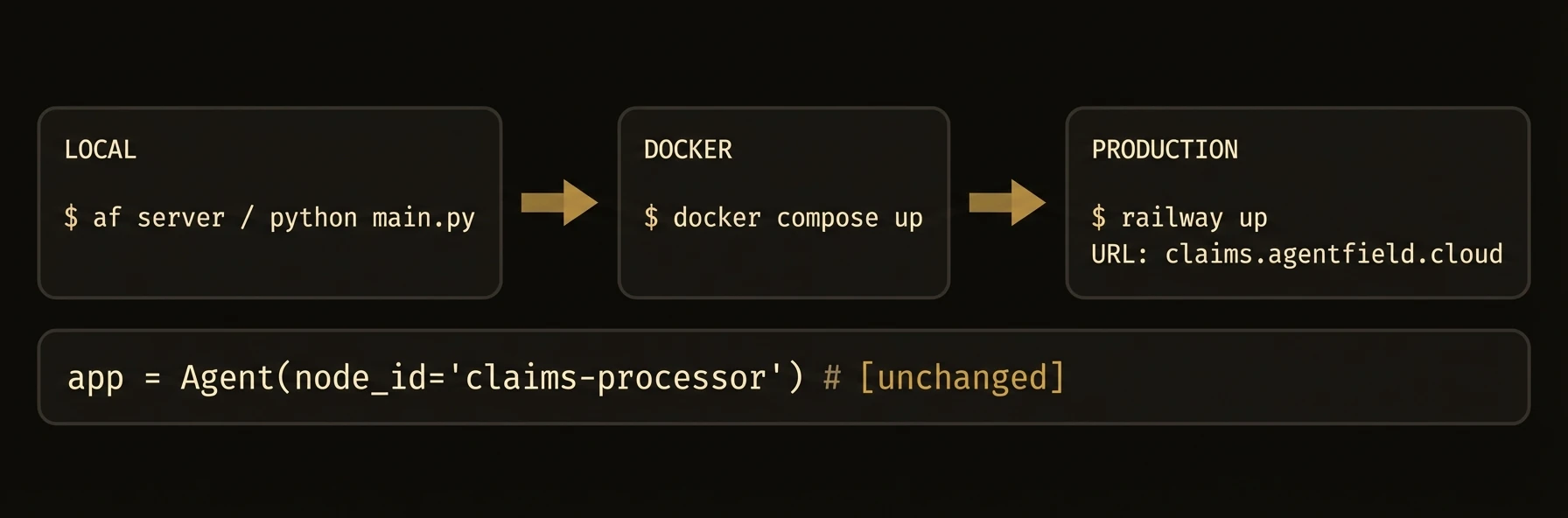
From local development to production Kubernetes -- one binary, zero vendor lock-in.
AgentField runs as a stateless control plane that agent nodes connect to over HTTP. The same agent code runs on your laptop, in Docker, in Kubernetes, or in a customer's private environment.
The key deployment story is not just where it runs. It is that teams can deploy agents independently while the control plane keeps routing, discovery, and workflow tracking consistent.
The Deployment Coordination Problem
Support needs to ship a bug fix. Analytics is running a long job. Another team is testing a new agent in staging. In a monolith, everyone waits. In a raw microservice stack, everyone coordinates service discovery, routing, and rollout plumbing.
AgentField removes most of that coordination burden:
- Stateless control plane -- scale the routing/orchestration layer independently
- Independent agent scaling -- each agent family deploys and scales on its own schedule
- Agents anywhere -- cloud, Docker, Kubernetes, on-prem, or private networks
- Same code everywhere -- your agent code does not change across environments
Local To Production
af server
# local dev, SQLite, zero extra infrastructure

export AGENTFIELD_POSTGRES_URL="postgres://user:pass@db.company.com/agentfield"
af server
# same binary, production storage backend
What changes is the storage backend and where agents run. What does not change is the control-plane model, your agent code, or the API contract.
What just happened
The same af server process was shown in both local and production modes, with only the storage backend changing. That is the deployment promise this page needs to make explicit: the control-plane shape stays stable while environments and agent placements change around it.
{
  "control_plane_binary": "same",
  "local_storage": "sqlite",
  "production_storage": "postgres",
  "agent_code": "unchanged"
}
Storage Modes
| Mode | Backend | Best For |
|---|---|---|
local | SQLite | Development, single-node deployments |
postgres | PostgreSQL | Production, multi-replica deployments |
SQLite is the default. No database setup required.
Local Development
af server          # Control plane on http://localhost:8080 with SQLite
python app.py      # Or run your TypeScript / Go agent in a second terminal
No Docker, no database, no configuration files required.
Deployment Model
| Capability | What stays the same |
|---|---|
| Laptop | Same control plane, same agent APIs, fastest iteration |
| Docker | Same binary, same routes, isolated team environments |
| Kubernetes | Same control plane model, now with replicas, probes, and managed rollout |
| On-prem / hybrid | Same agent code, different network placement and storage configuration |
Storage Configuration
Storage Modes
Configure via --storage-mode or storage.mode in agentfield.yaml.
For PostgreSQL:
af server --storage-mode=postgres \
  --postgres-url="postgres://user:pass@db-host:5432/agentfield?sslmode=require"
Or in agentfield.yaml:
storage:
  mode: postgres
  postgres:
    url: "postgres://user:pass@db-host:5432/agentfield"
    sslmode: require
    max_open_conns: 25
    max_idle_conns: 5
    conn_max_lifetime: 30m
Docker
Docker
Single Container
docker run -d \
  -p 8080:8080 \
  -v agentfield-data:/data \
  --name agentfield \
  agentfield/control-plane:latest
Docker Compose
services:
  agentfield:
    image: agentfield/control-plane:latest
    ports:
      - "8080:8080"
    volumes:
      - agentfield-data:/data
    environment:
      AGENTFIELD_HOME: /data
    restart: unless-stopped

  # Optional: PostgreSQL for production storage
  postgres:
    image: pgvector/pgvector:pg16
    environment:
      POSTGRES_DB: agentfield
      POSTGRES_USER: agentfield
      POSTGRES_PASSWORD: changeme
    volumes:
      - pg-data:/var/lib/postgresql/data

volumes:
  agentfield-data:
  pg-data:
To use PostgreSQL, add to the agentfield service:
environment:
  AGENTFIELD_HOME: /data
  AGENTFIELD_STORAGE_MODE: postgres
  AGENTFIELD_POSTGRES_URL: "postgres://agentfield:changeme@postgres:5432/agentfield?sslmode=disable"
Kubernetes
Kubernetes
Deployment
apiVersion: apps/v1
kind: Deployment
metadata:
  name: agentfield-control-plane
spec:
  replicas: 1
  selector:
    matchLabels:
      app: agentfield
  template:
    metadata:
      labels:
        app: agentfield
    spec:
      containers:
        - name: agentfield
          image: agentfield/control-plane:latest
          ports:
            - containerPort: 8080
          env:
            - name: AGENTFIELD_HOME
              value: /data
          volumeMounts:
            - name: data
              mountPath: /data
          livenessProbe:
            httpGet:
              path: /api/v1/health
              port: 8080
            initialDelaySeconds: 5
            periodSeconds: 10
          readinessProbe:
            httpGet:
              path: /api/v1/health
              port: 8080
            initialDelaySeconds: 3
            periodSeconds: 5
          resources:
            requests:
              cpu: 100m
              memory: 128Mi
            limits:
              cpu: "1"
              memory: 512Mi
      volumes:
        - name: data
          persistentVolumeClaim:
            claimName: agentfield-data
Service
apiVersion: v1
kind: Service
metadata:
  name: agentfield
spec:
  selector:
    app: agentfield
  ports:
    - port: 8080
      targetPort: 8080
type: ClusterIPHealth Probes
| Endpoint | Purpose |
|---|---|
GET /api/v1/health | Liveness -- returns 200 if the process is alive |
GET /metrics | Prometheus metrics for monitoring |
Cloud Platforms
Cloud Platforms
Railway
railway upSet AGENTFIELD_HOME=/data and attach a persistent volume at /data.
Fly.io
fly launch --image ghcr.io/agent-field/agentfield:latest
fly volumes create agentfield_data --size 1
fly secrets set AGENTFIELD_HOME=/data
AWS ECS / Fargate
Use the Docker image with an EFS volume for persistent storage, or switch to PostgreSQL (RDS) for production workloads.
Google Cloud Run
gcloud run deploy agentfield \
  --image ghcr.io/agent-field/agentfield:latest \
  --port 8080 \
  --set-env-vars "AGENTFIELD_STORAGE_MODE=postgres,AGENTFIELD_POSTGRES_URL=..."
Environment Variables and Production Checklist
Environment Variables
| Variable | Description | Default |
|---|---|---|
AGENTFIELD_HOME | Data directory for SQLite, keys, payloads | ~/.agentfield |
AGENTFIELD_SERVER | Control plane URL for agent registration | http://localhost:8080 |
AGENTFIELD_STORAGE_MODE | local or postgres | local |
AGENTFIELD_POSTGRES_URL | PostgreSQL connection string | -- |
AGENTFIELD_AUTHORIZATION_ADMIN_TOKEN | Admin token for authorization endpoints | -- |
AGENTFIELD_CONFIG_SOURCE | Set to db to overlay config from database | -- |
Production Checklist
- Switch to PostgreSQL storage
- Set a strong
AGENTFIELD_AUTHORIZATION_ADMIN_TOKEN - Enable DID authorization (
features.did.authorization.enabled: true) - Set
tag_approval_rules.default_modetomanual - Configure an observability webhook for external monitoring
- Set up persistent volumes or managed database
- Configure liveness and readiness probes
- Enable TLS termination (via load balancer or reverse proxy)