Versioning & lifecycle
Agent version tracking, lifecycle states, heartbeat monitoring, and lease-based presence
A full lifecycle state machine, lease-based presence detection, and fleet-wide health monitoring -- built into every agent.
Every agent moves through a defined lifecycle (starting -> ready -> degraded -> offline) and proves it is alive via lease-based heartbeats. The control plane automatically detects unresponsive agents, transitions them through degraded states, and evicts them after configurable TTLs. Run two versions side by side, monitor your entire fleet in one API call, and drain gracefully on shutdown -- no external health checker needed.
from agentfield import Agent

# Blue-green: run two versions side by side, each with its own lifecycle
app_v2 = Agent(
    node_id="processor-blue",
    version="2.0.0",
    tags=["processor", "stable"],
)

app_v3 = Agent(
    node_id="processor-green",
    version="3.0.0",
    tags=["processor", "canary"],
)

# Lifecycle is automatic:
#   startup  → starting → ready  (heartbeats begin)
#   trouble  → ready → degraded            (missed health checks)
#   recovery → degraded → ready            (health checks pass again)
#   shutdown → drains active executions → releases lease → offline

# The SDK handles graceful shutdown automatically (SIGTERM/SIGINT)
What just happened
- Version and lifecycle state were reported to the control plane automatically
- Presence was tracked through leases and heartbeats instead of custom health plumbing
- Fleet status could be queried centrally without logging into each node
Example fleet snapshot:
{
  "processor-blue": { "status": "ready", "version": "2.0.0" },
  "processor-green": { "status": "ready", "version": "3.0.0" },
  "analyzer": { "status": "degraded", "version": "1.2.0" }
}
What you get
- Version tracking -- every agent registers its version string with the control plane
- Lifecycle state machine -- agents move through
starting,ready,degraded, andoffline - Heartbeat monitoring -- periodic health checks with configurable thresholds for staleness detection
- Lease-based presence -- agents hold time-limited leases; missed renewals trigger automatic status transitions
- Bulk status queries -- check the health of your entire fleet in one call
Setting the version
from agentfield import Agent

app = Agent(
    node_id="data-processor",
    version="2.1.0",  # Reported at registration and every heartbeat
)
The version string is freeform -- use semantic versioning, git SHAs, or any scheme that fits your deployment workflow. The control plane stores it alongside the agent registration and includes it in status queries.
Lifecycle states
Every agent node progresses through a defined set of lifecycle states:
| State | Description |
|---|---|
starting | Agent process is initializing (connecting, loading models, etc.) |
ready | Healthy and accepting executions |
degraded | Running but experiencing issues (failed health checks, high latency) |
offline | Not responding; heartbeat expired |
State Transitions
The control plane manages state transitions through two complementary systems:
StatusManager -- the single source of truth for agent status. It reconciles between reported status, heartbeat data, and health checks:
| Setting | Default | Description |
|---|---|---|
| Reconcile interval | 30 seconds | How often the manager checks for stale or inconsistent states |
| Status cache TTL | 5 minutes | How long cached status is considered fresh |
| Max transition time | 2 minutes | Maximum time an agent can stay in a transitional state |
| Heartbeat stale threshold | Configurable | How old a heartbeat must be before marking inactive |
PresenceManager -- tracks node leases and handles expiry:
| Setting | Default | Description |
|---|---|---|
| Heartbeat TTL | 15 seconds | How long a heartbeat is considered valid |
| Sweep interval | 5 seconds | How often to check for expired leases |
| Hard evict TTL | 5 minutes | After this period without a heartbeat, the agent is forcibly unregistered |
Heartbeat protocol
Agents send periodic heartbeats to prove they are alive:
POST /api/v1/nodes/{node_id}/heartbeat
The heartbeat includes the agent's current version, which allows the control plane to detect version changes without re-registration.
The presence manager updates the agent's lease on each heartbeat. If no heartbeat arrives within the TTL:
- The agent is marked
offline - After the hard evict TTL, the agent is unregistered from health monitoring
- Active executions on the agent are tracked but new executions are not routed to it
Lease Renewal
Agents can also renew their lease with additional status metadata:
PATCH /api/v1/nodes/{node_id}/status
This endpoint combines a heartbeat with a status update, allowing agents to report their current state, version, and any custom health data in a single call.
Health monitor and configuration
The control plane runs a background health monitor that periodically checks agent health:
| Setting | Description |
|---|---|
| Check interval | How often to probe each agent |
| Check timeout | Maximum time to wait for a health check response |
| Consecutive failures | Number of failed checks before marking degraded |
| Recovery debounce | How long an agent must be healthy before transitioning back to ready |
These are configured in agentfield.yaml:
agentfield:
  node_health:
    check_interval: 30s
    check_timeout: 5s
    consecutive_failures: 3
    recovery_debounce: 60s
    heartbeat_stale_threshold: 60s
Traffic Splitting & Canary Deployments
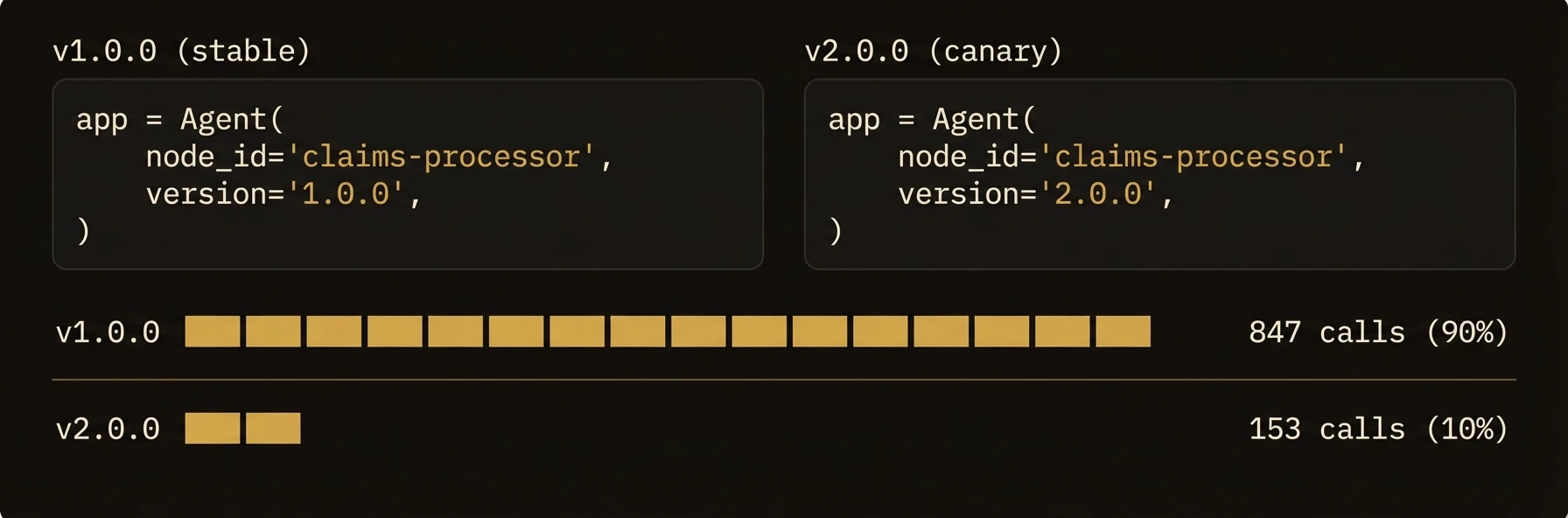
For canaries and A/B tests, run multiple healthy agent processes with the same node_id and different version values. Calls to POST /api/v1/execute/{node_id}.{reasoner} stay stable while the control plane selects a version by traffic_weight and returns X-Routed-Version on the response.
Patterns
Native weighted split
Use this when the split is a deployment concern and callers should keep one stable target:
# Control
app_v1 = Agent(
    node_id="processor",
    version="2.0.0",
    tags=["processor", "variant:control"],
)

# Treatment
app_v2 = Agent(
    node_id="processor",
    version="2.1.0",
    tags=["processor", "variant:treatment"],
)
curl -X PUT -H "X-Connector-Token: $AGENTFIELD_CONNECTOR_TOKEN" \
-H "Content-Type: application/json" \
-d '{"weight": 10}' \
http://localhost:8080/api/v1/connector/reasoners/processor/versions/2.1.0/weightExplicit blue-green nodes
Use separate node IDs when you want callers or orchestration code to choose the deployment explicitly:
app_blue = Agent(node_id="processor-blue", version="2.0.0", tags=["processor", "blue"])
app_green = Agent(node_id="processor-green", version="2.1.0", tags=["processor", "green"])
Graceful Shutdown
The SDK handles graceful shutdown automatically when SIGTERM or SIGINT is received:
- The agent stops accepting new executions
- Active executions drain to completion (with a configurable timeout)
- The agent sends a shutdown notification to the control plane
- The presence lease is released
# The SDK handles this automatically via SIGTERM/SIGINT signal handlers.
# No custom hook is needed — the agent drains and deregisters on its own.
API reference
Node Registration
POST /api/v1/nodes/register
POST /api/v1/nodes
Registers an agent node with the control plane. The version, tags, capabilities, and callback URL are all included in the registration payload.
Node Status
GET /api/v1/nodes/{node_id}/status
Returns the agent's current lifecycle state, version, last heartbeat time, and health check results.
Refresh Node Status
POST /api/v1/nodes/{node_id}/status/refresh
Forces an immediate status reconciliation for a single node, bypassing the cache.
Bulk Status
POST /api/v1/nodes/status/bulk
Fetch status for multiple nodes in one call. Useful for dashboards and fleet monitoring.
Refresh All
POST /api/v1/nodes/status/refresh
Triggers a full fleet status reconciliation.
Lifecycle Actions
POST /api/v1/nodes/{node_id}/start
POST /api/v1/nodes/{node_id}/stop
POST /api/v1/nodes/{node_id}/shutdown
These endpoints trigger lifecycle transitions. shutdown performs a graceful shutdown sequence: the agent drains active executions, deregisters from monitoring, and releases its lease.
Lifecycle Status Update (Agent-Reported)
POST /api/v1/nodes/{node_id}/lifecycle/status
Agents use this endpoint to report their own lifecycle state changes (e.g., transitioning from starting to ready after initialization completes).