Access policies
Tag-based access control for cross-agent calls with ALLOW/DENY rules and tag approval workflow
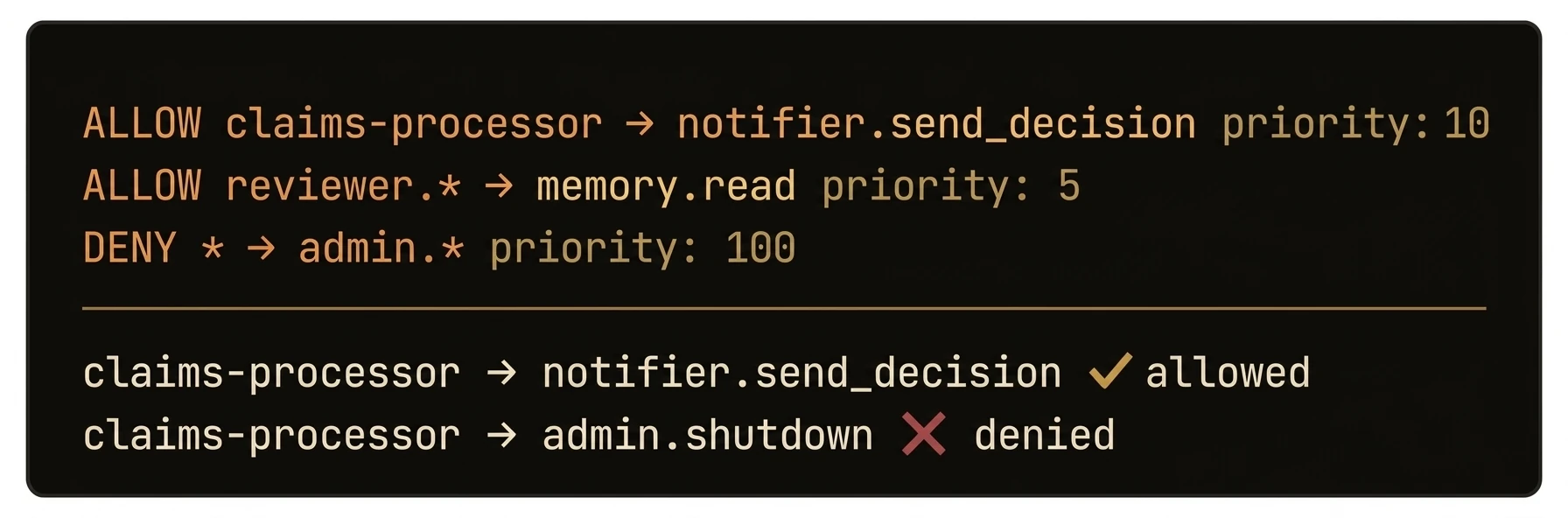
Control which agents can call which functions using tag-based ALLOW/DENY rules -- no hardcoded ACLs required.
AgentField evaluates access policies on every cross-agent call. Policies match on caller and target tags (not specific agent IDs), support function-level granularity with input constraints, and are sorted by priority with first-match-wins semantics. Within each policy, deny_functions are checked before allow_functions, but across policies the result is determined by the first matching policy in priority order. Fail-open by default: if no policy matches, the call is allowed (backward compatibility).
from agentfield import Agent

# The treasury agent — only callers with the right tags get through
app = Agent(
    node_id="treasury",
    version="1.0.0",
    tags=["finance", "transfers"],
    local_verification=True,  # Evaluate policies locally, no round-trip to CP
)

@app.reasoner()
async def high_value_transfer(amount: float, execution_context=None) -> dict:
    # Policy engine runs BEFORE this handler — if caller lacks "finance-ops" tag, they get 403
    caller_did = execution_context.caller_did
    app.note(f"Transfer ${amount:,.2f} authorized for {caller_did}", ["audit", "finance"])
    return await app.ai(system="Process this transfer.", user=str(amount))

# What callers see:
# ✅ Agent tagged ["finance-ops"] → calls treasury.high_value_transfer → 200 OK
# ❌ Agent tagged ["analytics"]   → calls treasury.high_value_transfer → 403 DENIED
# ❌ Agent tagged ["finance-ops"] → calls treasury.delete_account      → 403 DENIED (deny_functions)
What just happened
The example created real allow and deny rules, attached them to caller and target tags, and then showed where to inspect the resulting policy state. That is the core value to surface here: authorization decisions live in the control plane and can be reasoned about as explicit policy data.
{
  "caller_tags": ["finance-ops"],
  "target_tags": ["finance", "transfers"],
  "allow_functions": ["high_value_transfer", "balance_check"],
  "deny_functions": ["delete_account", "modify_ledger"],
  "priority": 100
}
What you get
- Tag-based authorization -- policies match on caller and target tags, not specific agent IDs
- ALLOW/DENY semantics -- within each policy, deny rules are checked before allow rules; across policies, highest priority wins. Fail-open by default (access allowed when no policy matches)
- Priority ordering -- multiple policies evaluated highest-priority first; first match wins
- Function-level granularity -- restrict access to specific reasoners and skills within an agent
- Input constraints -- policies can enforce conditions on execution input parameters
- Tag approval workflow -- tags can be auto-approved, require manual review, or be forbidden entirely
- Cryptographic tag verification -- tag VCs prove an agent's tags were legitimately assigned
How policies work
When Agent A calls a function on Agent B, the control plane evaluates access policies:
Policy Evaluation Order
- Policies are sorted by priority (highest first), with ID as tie-breaker
- For each enabled policy:
- Check if caller tags intersect with the policy's
caller_tags - Check if target tags intersect with the policy's
target_tags - If both match, check the function against
deny_functions(deny takes precedence) - Then check against
allow_functions(if set, function must be in the list) - Evaluate input
constraintsif present
- Check if caller tags intersect with the policy's
- First matching policy determines the result
- If no policy matches, the result is "no match" (access allowed for backward compatibility)
Policy Structure
{
  "name": "Analytics can read data processors",
  "caller_tags": ["analytics"],
  "target_tags": ["data-processor"],
  "allow_functions": ["query", "aggregate", "summarize"],
  "deny_functions": ["delete", "modify"],
  "constraints": {
    "region": {"operator": "==", "value": "us-east-1"}
  },
  "action": "allow",
  "priority": 100,
  "enabled": true
}| Field | Type | Description |
|---|---|---|
name | string | Human-readable policy name |
caller_tags | string[] | Tags the calling agent must have (any match) |
target_tags | string[] | Tags the target agent must have (any match) |
allow_functions | string[] | Functions explicitly allowed (empty = all allowed) |
deny_functions | string[] | Functions explicitly denied (checked before allow) |
constraints | map[string]AccessConstraint | Parameter constraints with operator and value fields |
action | string | "allow" or "deny" |
priority | int | Higher number = higher priority |
enabled | bool | Whether the policy is active |
Tag approval workflow
When agents register with tags, those tags may require approval before the agent becomes operational:
Approval Modes
| Mode | Behavior |
|---|---|
auto | Tags are approved immediately (default) |
manual | Tags require human approval; agent enters pending_approval state |
forbidden | Tags are rejected; agent cannot register with them |
Configure tag rules in agentfield.yaml:
features:
  did:
    authorization:
      tag_approval_rules:
        default_mode: auto
        rules:
          - tags: ["pii-handler", "financial"]
            approval: manual
          - tags: ["admin", "root"]
            approval: forbidden
Approval Flow
When tags require manual review, the agent enters pending_approval lifecycle status. It cannot accept executions until an administrator approves or modifies its tags.
Tag VCs
Upon approval, the control plane issues a tag VC -- a cryptographically signed credential certifying the agent's authorized tags. This VC is verified during policy evaluation to ensure tags have not been tampered with.
See Credentials for details on the VC format and verification.
Patterns
Least-Privilege Agent Tags
Assign minimal tags and create explicit allow policies:
# Data processor with restricted tags
app = Agent(
    node_id="data-processor",
    version="1.0.0",
    tags=["data-processor", "read-only"],
)

# Only agents tagged "analytics" can call this agent
# Only the "query" and "aggregate" functions are exposed
{
"name": "Read-only data access for analytics",
"caller_tags": ["analytics"],
"target_tags": ["data-processor", "read-only"],
"allow_functions": ["query", "aggregate"],
"deny_functions": ["delete", "modify", "truncate"],
"action": "allow",
"priority": 100
}Environment Isolation
Use tags to separate staging from production:
{
  "name": "Block staging -> production",
  "caller_tags": ["env:staging"],
  "target_tags": ["env:production"],
  "deny_functions": ["*"],
  "action": "deny",
  "priority": 1000
}
Input Constraints
Restrict what parameters can be passed to sensitive functions:
{
  "name": "Region-locked data access",
  "caller_tags": ["analytics"],
  "target_tags": ["data-store"],
  "allow_functions": ["query"],
  "constraints": {
    "region": {"operator": "==", "value": "us-east-1"}
  },
  "action": "allow",
  "priority": 150
}
When constraints are set, the policy evaluator checks the execution's input parameters against the constraint map. Each constraint specifies an operator ("==", "<=", ">=", "<", ">", "!=") and a value. If the input does not satisfy the constraint conditions, the policy does not match (fail-closed).
API reference
List Policies
GET /api/v1/admin/policies
Returns all access policies, sorted by priority.
Create Policy
POST /api/v1/admin/policies
{
  "name": "Compliance agents can audit all functions",
  "caller_tags": ["compliance", "auditor"],
  "target_tags": ["*"],
  "allow_functions": [],
  "deny_functions": [],
  "constraints": {},
  "action": "allow",
  "priority": 200
}
Update Policy
PUT /api/v1/admin/policies/{id}
Updates an existing policy. The full policy object must be provided.
Delete Policy
DELETE /api/v1/admin/policies/{id}
Removes a policy. Active executions already authorized by this policy are not affected.
Revocations
GET /api/v1/revocations
Lists revoked DIDs. Agents cache this list for local verification to ensure revoked DIDs are rejected during policy evaluation.
Authorization Overview (UI)
GET /api/ui/v1/authorization/agents
Returns all agents with their current tags, tag VC status, and approval state.