Configuration Reference
Complete reference for AIConfig, AsyncConfig, MemoryConfig, HarnessConfig, WebhookConfig, ToolCallConfig, and control-plane ARD guardrails.
Every knob your agents expose -- cost caps, rate limits, fallbacks, memory backends, and tool behavior.
AgentField agents are configured through typed config objects that control AI behavior, async execution, memory storage, harness loops, webhooks, and tool calling. Set defaults at agent creation time, then override per-call when you need different behavior.
Control-plane features such as external agent discovery are configured separately in agentfield.yaml or environment variables. Those settings define what the deployment is allowed to expose; per-reasoner publishing, imports, and callable external bindings are runtime state.
from agentfield import Agent, AIConfig, MemoryConfig, HarnessConfig

# Production-ready agent with cost controls, fallbacks, and memory
app = Agent(
    node_id="production-agent",
    ai_config=AIConfig(
        model="anthropic/claude-sonnet-4-20250514",
        fallback_models=["openai/gpt-4o", "deepseek/deepseek-chat"],
        max_cost_per_call=0.05,                # hard cost cap per LLM call
        temperature=0.3,                       # consistent outputs
        max_tokens=4096,                       # response length limit
        enable_rate_limit_retry=True,          # auto-retry on 429s
        rate_limit_max_retries=5,              # max retry attempts
        fal_api_key="your-fal-key",            # fal.ai API key for media generation
    ),
    memory_config=MemoryConfig(
        auto_inject=["workflow", "session"],    # memory scopes to auto-inject
        memory_retention="session",             # retention policy
        cache_results=True,                     # cache memory results locally
    ),
    harness_config=HarnessConfig(
        # provider omitted -> "aforge", AgentField's native default harness
        max_turns=15,                          # max reasoning turns per harness
    ),
)
AIConfig
Controls LLM behavior, model selection, cost limits, and rate limiting.
| Field | Type | Default | Description |
|---|---|---|---|
model | str | "gpt-4o" | Default LLM model (LiteLLM format: provider/model) |
fallback_models | list[str] | [] | Ordered fallback models when primary fails |
temperature | float | None | Creativity/randomness (0.0-2.0). None uses model default |
max_tokens | int | None | Maximum tokens in LLM response. None uses model default |
max_cost_per_call | float | None | Hard cost cap per individual AI call ($) |
daily_budget | float | None | Daily budget for AI calls in USD |
enable_rate_limit_retry | bool | True | Auto-retry on HTTP 429 rate limit errors |
rate_limit_max_retries | int | 5 | Maximum retry attempts for rate limits |
rate_limit_base_delay | float | 0.5 | Base delay for rate limit backoff in seconds |
rate_limit_max_delay | float | 30.0 | Maximum delay for rate limit backoff in seconds |
rate_limit_jitter_factor | float | 0.25 | Jitter factor for rate limit retry delays |
rate_limit_circuit_breaker_threshold | int | 5 | Consecutive failures before circuit breaker opens |
rate_limit_circuit_breaker_timeout | int | 30 | Seconds before circuit breaker resets |
fal_api_key | str | None | fal.ai API key (or set FAL_KEY env var) |
api_key | str | None | Provider API key (or use env vars) |
api_base | str | None | Custom API base URL for self-hosted models |
response_format | str | "auto" | Default response format: "auto", "json", "text" |
timeout | int | None | None | HTTP timeout per LLM call in seconds |
auto_inject_memory | list[str] | [] | Memory scopes to auto-inject into AI calls |
litellm_params | dict | {} | Additional parameters passed to LiteLLM |
Note: TypeScript SDK rate limit defaults differ significantly from Python:
rateLimitMaxRetriesdefaults to 20 (vs 5 in Python) andrateLimitMaxDelaydefaults to 300s (vs 30s in Python).
Per-Call Override
Every AIConfig field can be overridden on individual app.ai() calls:
# Agent defaults to GPT-4o
# This call uses Claude at temperature 0.0
result = await app.ai(
    user="Analyze this contract clause.",
    model="anthropic/claude-sonnet-4-20250514",
    temperature=0.0,
    max_tokens=8192,
)
AsyncConfig (Python)
Controls internal async execution behavior: adaptive polling intervals, connection pooling, timeouts, batching, and circuit breakers. This is a low-level tuning configuration -- most users do not need to modify it.
Async executions are initiated via the REST API (POST /api/v1/execute/async/:target). The Python SDK's AsyncConfig controls how the SDK internally polls for completion.
| Field | Type | Default | Description |
|---|---|---|---|
initial_poll_interval | float | 0.03 | Initial polling interval (seconds) |
fast_poll_interval | float | 0.08 | Polling interval for short executions (0-10s) |
medium_poll_interval | float | 0.4 | Polling interval for medium executions (10s-60s) |
slow_poll_interval | float | 1.5 | Polling interval for long executions (60s+) |
max_execution_timeout | float | 21600.0 | Maximum execution time (6 hours) |
default_execution_timeout | float | 7200.0 | Default execution timeout (2 hours) |
max_concurrent_executions | int | 4096 | Maximum concurrent executions to track |
batch_size | int | 100 | Maximum executions per batch status check |
enable_event_stream | bool | False | Subscribe to SSE updates when available |
from agentfield.async_config import AsyncConfig

config = AsyncConfig(
    default_execution_timeout=600.0,
    max_concurrent_executions=2048,
    enable_event_stream=True,
)
# Or load from AGENTFIELD_ASYNC_* environment variables:
config = AsyncConfig.from_environment()
MemoryConfig
Controls memory behavior and scope configuration.
Python (MemoryConfig dataclass):
| Field | Type | Default | Description |
|---|---|---|---|
auto_inject | list[str] | required | Memory scopes to auto-inject into context |
memory_retention | str | required | Retention policy (e.g. "session") |
cache_results | bool | required | Cache memory results locally |
TypeScript (MemoryConfig interface):
| Field | Type | Default | Description |
|---|---|---|---|
defaultScope | MemoryScope | -- | Default memory scope ("workflow", "session", "actor", "global") |
ttl | number | -- | Default TTL for keys |
Go: The Go SDK uses a pluggable MemoryBackend interface on the Config struct instead of a MemoryConfig. See the Go SDK docs for details on NewInMemoryBackend() and NewControlPlaneMemoryBackend().
Memory storage backends (Redis, PostgreSQL, etc.) are configured at the control plane level, not in the SDK memory config.
HarnessConfig
Controls harness orchestration -- provider, max turns, cost caps, and tool configuration.
provider is optional. Left unset, harness calls run AForge,
AgentField's native harness, which is installed alongside the af binary and needs only
OPENROUTER_API_KEY. Precedence: an explicit provider (per call, then on the config), then
AGENTFIELD_HARNESS_PROVIDER, then "aforge".
| Field | Type | Default | Description |
|---|---|---|---|
provider | str | "aforge" | Harness provider: "aforge" (default), "claude-code", "codex", "gemini", "opencode", "grok" (Python SDK only) |
model | str | None | Model identifier. None/empty means the provider's own default (AFORGE_MODEL overrides AForge's). |
max_turns | int | 30 | Maximum agent iterations |
max_budget_usd | float | None | USD cost cap — enforced by claude-code only; AForge bounds work with max_turns/timeout instead |
max_retries | int | 3 | Maximum retry attempts for transient errors |
initial_delay | float | 1.0 | Initial retry delay in seconds |
max_delay | float | 30.0 | Maximum retry delay in seconds |
backoff_factor | float | 2.0 | Exponential backoff multiplier |
tools | list[str] | ["Read", "Write", "Edit", "Bash", "Glob", "Grep"] | Allowed tools (claude-code only) |
permission_mode | str | None | Permission mode: "plan", "auto", or None (claude-code, codex, gemini; ignored by AForge) |
system_prompt | str | None | System prompt for the harness provider |
env | dict[str, str] | {} | Environment variables for the agent process |
cwd | str | None | Working directory |
# Harness with a tight turn cap for simple tasks -- default worker, nothing to install
simple_harness = HarnessConfig(
    max_turns=3,
)

# Harness with a deeper turn cap for complex analysis
deep_harness = HarnessConfig(
    max_turns=60,
)

# Bring your own coding agent -- one field, plus that provider's install and key
claude_harness = HarnessConfig(
    provider="claude-code",
    max_turns=20,
    max_budget_usd=5.0,
)
max_budget_usd reaches the claude-code provider only. AForge takes a token budget rather than a
dollar cap, so bound an AForge run with max_turns and AGENTFIELD_HARNESS_TIMEOUT_SECONDS
(default 1800), then read result.cost_usd after the run.
WebhookConfig
Controls webhook delivery for execution completion notifications.
| Field | Type | Default | Description |
|---|---|---|---|
url | str | Required | HTTPS endpoint to receive callbacks |
secret | str | None | HMAC-SHA256 secret for signature verification |
headers | dict[str, str] | None | Custom headers included in delivery |
Webhook retry behavior (max retries, backoff, timeouts) is configured at the control plane level, not in the SDK's WebhookConfig.
ToolCallConfig
Controls tool calling behavior within app.ai() and harness runs.
| Field | Type | Default | Description |
|---|---|---|---|
max_turns | int | 10 | Maximum LLM turns in the tool-call loop |
max_tool_calls | int | 25 | Maximum total tool invocations |
tags | list[str] | None | Filter discovered tools by tags |
agent_ids | list[str] | None | Filter discovered tools by agent IDs |
schema_hydration | str | "eager" | Schema hydration strategy: "eager" or "lazy" |
fallback_broadening | bool | False | Broaden discovery if initial filter yields no tools |
from agentfield import ToolCallConfig

result = await app.ai(
    system="You are a data analyst with access to tools.",
    user="What were our top 5 products last quarter?",
    tools=ToolCallConfig(
        max_turns=3,
        max_tool_calls=10,
        tags=["database"],
        agent_ids=["data-agent"],
    ),
)
ARD control-plane config
Agentic Resource Discovery (ARD) is configured at the control-plane level, not in an individual SDK agent.
Config says what the deployment is allowed to do. The database stores what operators have currently enabled in the UI: per-reasoner publish toggles, metadata overrides, imported external entries, callable bindings, and registry records.
agentfield:
  ard:
    enabled: true
    public_base_url: "https://control-plane.example.com"
    publisher_domain: "example.com"
    host:
      display_name: "Example AgentField Control Plane"
      identifier: "did:web:example.com"
      documentation_url: "https://example.com/docs/agents"
    publish:
      enabled: true
      include_health_statuses: ["active", "unknown"]
      default_type: "application/openapi+json"
    registry:
      enabled: true
      public: true
    external:
      search_enabled: true
      invocation_enabled: false
      allowed_registries:
        - "https://registry.partner.example/api/v1/ard"
default_search_limit: 10| Field | Description |
|---|---|
agentfield.ard.enabled | Makes ARD available in the control plane. Does not publish entries by itself. |
public_base_url | Public URL used in /.well-known/ai-catalog.json and generated artifact links. |
publisher_domain | Publisher domain used for catalog identity and host metadata. |
host.display_name | Human-readable catalog host name. |
host.identifier | Optional DID or stable identifier for the catalog host. |
publish.enabled | Allows public catalog routes to serve published entries. |
publish.include_health_statuses | Health statuses eligible for catalog publication. |
publish.default_type | Default artifact media type for generated entries. |
registry.enabled | Enables ARD registry endpoints under /api/v1/ard. |
registry.public | Allows registry search/list/explore routes to be public. |
external.search_enabled | Allows the UI to search configured external ARD registries. |
external.invocation_enabled | Allows imported external entries to become callable external.* targets. |
external.allowed_registries | Allowlist of external ARD registry URLs the control plane may search. |
external.default_search_limit | Default result limit for external ARD search. |
See Expose agents to external discovery for the operator workflow.
Environment variables
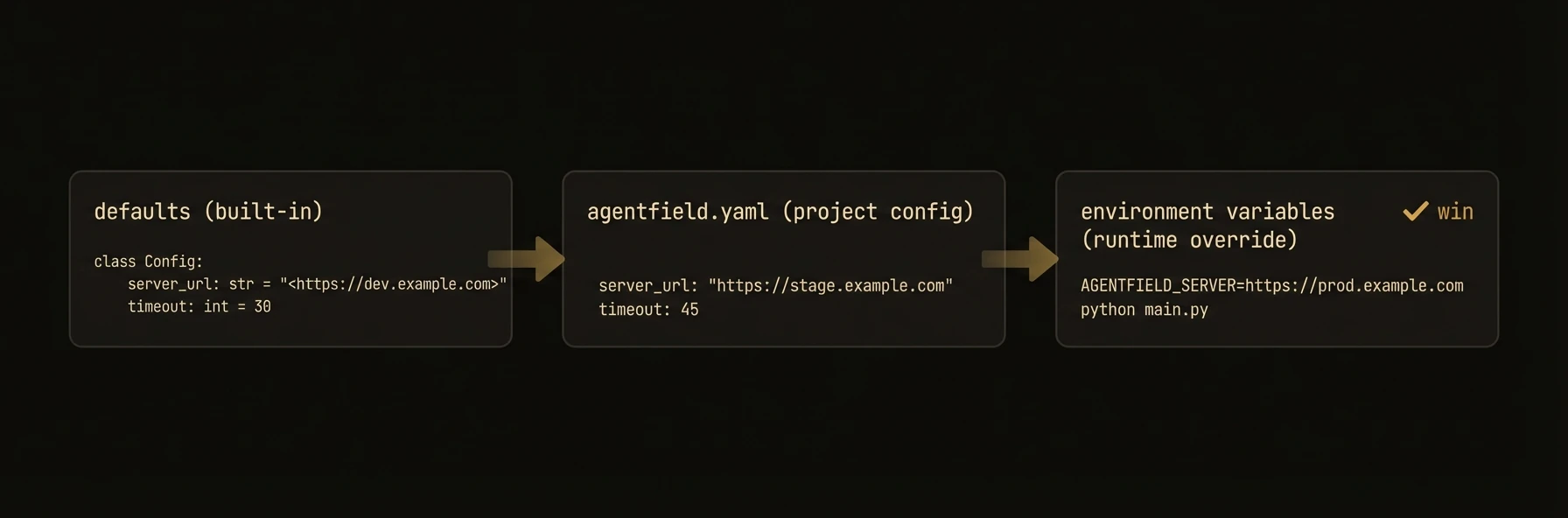
All config values can be set via environment variables. Explicit parameters take precedence over environment variables, which take precedence over defaults (i.e., explicit params > env vars > defaults).
| Variable | Config Field | Description |
|---|---|---|
OPENAI_API_KEY | ai_config.api_key | OpenAI API key |
ANTHROPIC_API_KEY | ai_config.api_key | Anthropic API key |
FAL_KEY | ai_config.fal_api_key | fal.ai API key |
OPENROUTER_API_KEY | -- | OpenRouter API key (media generation, and the AForge harness) |
AGENTFIELD_HARNESS_PROVIDER | harness_config.provider | Default harness provider: aforge, claude-code, codex, gemini, opencode, or grok (Python SDK only). An explicit provider still wins. |
AFORGE_MODEL | -- | Model the AForge binary runs when model is unset (AForge only; read by aforge, not by the SDK) |
AGENTFIELD_SERVER | agentfield_server | Control plane URL |
AGENTFIELD_SERVER_URL | agentfield_server | Fallback control plane URL |
AGENTFIELD_LOG_LEVEL | -- | Logging level (DEBUG, INFO, WARN, ERROR) |
AGENTFIELD_ARD_ENABLED | agentfield.ard.enabled | Enable ARD availability in the control plane |
AGENTFIELD_ARD_PUBLIC_BASE_URL | agentfield.ard.public_base_url | Public control-plane URL used for catalog links |
AGENTFIELD_ARD_PUBLISHER_DOMAIN | agentfield.ard.publisher_domain | Publisher domain used in ARD host metadata |
AGENTFIELD_ARD_PUBLISH_ENABLED | agentfield.ard.publish.enabled | Allow public catalog routes to serve published entries |
AGENTFIELD_ARD_REGISTRY_ENABLED | agentfield.ard.registry.enabled | Enable ARD registry endpoints |
AGENTFIELD_ARD_REGISTRY_PUBLIC | agentfield.ard.registry.public | Allow public registry search/list/explore |
AGENTFIELD_ARD_EXTERNAL_SEARCH_ENABLED | agentfield.ard.external.search_enabled | Allow external ARD registry search |
AGENTFIELD_ARD_EXTERNAL_INVOCATION_ENABLED | agentfield.ard.external.invocation_enabled | Allow imported entries to become callable |
AGENTFIELD_ARD_EXTERNAL_ALLOWED_REGISTRIES | agentfield.ard.external.allowed_registries | Comma-separated external registry allowlist |